| Home | Previous Lesson: DropDown Calendar Service Next Lesson: Let PFC Write Its Code for You |
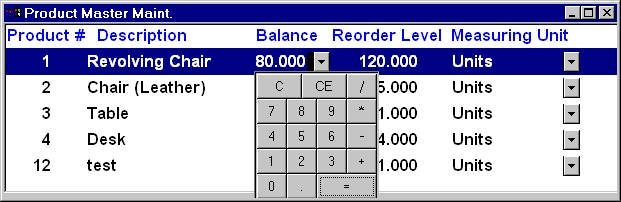
The DropDown Calculator service allows you to display Calculator for any numeric column in a DataWindow or in a EditMask control on a window. Just couple of function calls will do the job and it doesn't have many functions like other one.
The following code enables this service for product_balance column in the dw_product_master DataWindow in w_product_master window.
// Object: dw_tran_head in w_transactions
// Event: Constructor
this.of_SetDropDownCalculator(TRUE)
iuo_calculator.of_Register('product_balance', &
                  this.iuo_calculator.DDLB_WITHARROW)
iuo_calculator.of_setCloseOnClick(FALSE)
It has similar styles similar to the DropDown Calendar service. This service displays each clicked in the registered field live. Make sure to click the = sign before clicking on the other field, if you are doing any calculations, otherwise, it will leave the last part of the calculation in the field. For example, if you click 850/32 and click on the other field without clicking = sign, then the field will have 32, not the result of 850/32.
| Home | Previous Lesson: DropDown Calendar Service Next Lesson: Let PFC Write Its Code for You |