| Home | Previous Lesson: DropDown Calculator Service Next Lesson: Window Services |
PFC has a wonderful DataWindow service, 'DataWindow Properties Service' that is useful at development time. All you have to do is write a single line of code and run your PFC-enabled application. In this example, we placed a CommandButton in w_product_master and wrote the following:
dw_product.of_SetProperty(TRUE)
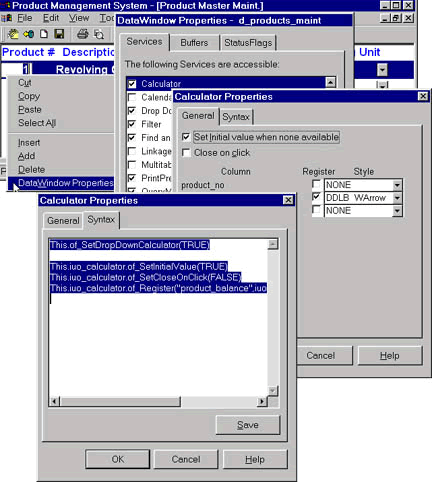
If you display popup menu for dw_product at run-time, you will see an additional option 'DataWindow Properties�'. Click on it to see a dialog box with tabbed pages. You will find all the DataWindow services listed in the Services page. Select the service you want and enable it and go to properties of that service and specify values. In the example, we selected Calculator service. Once you are done click on Syntax tab page to see the full code. You can either cut & paste it or save it to a file. Isn't it wonderful?
As all objects, their names and services are standardized in PFC, I hope third parties will come up with tools that can generate PFC code for you. PowerBuilder also has built-in meta-class functions such as FindClassDefinition() (Explained in 'OOP - PB Implementation session), etc. On top of it, PFC also has meta class service which will make things more easy to create PFC code generator tools.
| Home | Previous Lesson: DropDown Calculator Service Next Lesson: Window Services |