| Home | Previous Lesson: Checking the 'Required Columns' Service Next Lesson: DropDown Calculator Service |
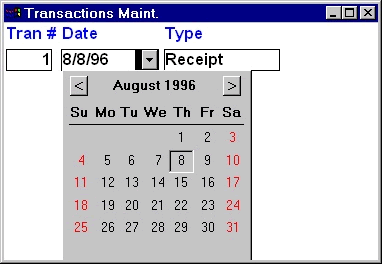
The DropDown Calendar service allows you to display calendar for any date column in a DataWindow or in a EditMask control on a window. Just couple of function calls will do the job and typically you will be calling few more functions to make it a little fancy.
The following code enables this service for tran_date column in the dw_tran_head DataWindow in w_transactions window.
// Object: dw_tran_head in w_transactions
// Event: Constructor
this.of_SetDropDownCalendar(TRUE)
this.iuo_calendar.of_Register('tran_date', &
        this.iuo_calendar.DDLB_WITHARROW)
Once you turn on the service for the DataWindow, you need to register column that need this service. The column name passed to this function is the column name in the DataWindow, not the database column name in the DataWindow. You can specify one of the three different styles for this service, i.e., DDLB, DDLB with arrow and no style.
// Display Saturdays and Sundays in bold.
iuo_calendar.of_SetSaturdayBold(TRUE)
iuo_calendar.of_SetSundayBold(TRUE)
iuo_calendar.of_SetSaturdayColor(RGB(255, 0, 0))
iuo_calendar.of_SetSundayColor( RGB(255, 0, 0))
You can display dates with weekdays of Saturday and Sunday in bold and/or with a different color. The above code displays them in bold and in Red color.
// Set holidays
date ldt_holidays[]
ldt_holidays[1] = Date('01-01-1996')
ldt_holidays[2] = Date('07-04-1996')
ldt_holidays[3] = Date('12-25-1996')
iuo_calendar.of_SetHoliday(ldt_holidays)
iuo_calendar.of_setHolidayBold(TRUE)
Saturday and Sunday are not holidays in some countries. Friday is a holiday in few countries, some countries have Sunday as a holiday but Saturday is a working day. In those cases, you may want to display Saturday and Sunday in normal color and set your country and/or company specific holidays using of_SetHoliday() and later display them in different color and bold if you wish. That is exactly the above code is doing. A typical real-world application retrieves all holiday dates from a table in the database and sets them instead of hard-coding as shown in the above example.
// Set special days, say company's 100th Ann.
date ldt_special[]
ldt_special[1]  = Date('11-29-1996')
iuo_calendar.of_SetMarkedDay(ldt_special)
iuo_calendar.of_SetMarkedDayColor( RGB(0, 255, 0))
You can mark some other days and display them with different color and bold if you wish. For example, you company may have blood donation days, company anniversary dates and so on. You can set them by calling of_SetMarkedDay() function.
// Let it disappear when user double-click on a date.
iuo_calendar.of_setCloseOnClick(FALSE)
iuo_calendar.of_setCloseOnDClick(TRUE)
The above code says the calendar service, when it should disappear from the screen, on single/double click? Double click would be the best option. When you enable it, make sure to disable single-click, otherwise single-click would be still in effect.
| Home | Previous Lesson: Checking the 'Required Columns' Service Next Lesson: DropDown Calculator Service |