| Home | Previous Lesson: Row Selection Service Next Lesson: Print Service |
Don't confuse Row Manager service with Row Selection Manager service. The later allows selecting rows in different ways where as the former one allows you inserting/ adding/ deleting/ restoring rows in a DataWindow. It also has functionality to delete selected rows and all rows in the dw. In order to allow the user to delete multiple rows at a time, either you need to write the logic or enable row selection manager.
Call the following RowManager functions if you need to call them from some where in the code.
of_DeleteAll()	Deletes all rows in the DataWindow
of_DeleteSelected()	Deletes selected rows.
of_DeleteRow()	Deletes the specified row.
of_InsertRow()	Inserts a row before the specified row.
of_Undelete()	Allows you to restore one or more deleted rows.
When you can call DataWindow's InsertRow(), why should you call RowManager's of_InsertRow()? Good question! The later takes care of scrolling to the row and setting the focus to the first column as per the tab order.
In order to use this service, all you need to do is just enable the service as shown below. You don't need to write any other code.
// Object: w_product_master
// Event: pfc_PostOpen
// Append to the existing code.
dw_product.of_SetRowManager(True)
dw_product.inv_RowManager.of_SetConfirmOnDelete(True)
By default, PFC deletes the row silently when the user select Delete popup menu option. The last line in the above code prompts the user for the confirmating the delete. Please note that, it doesn't delete from the database until you close the window or you programmed to save changes on row focus change in the link manager service.
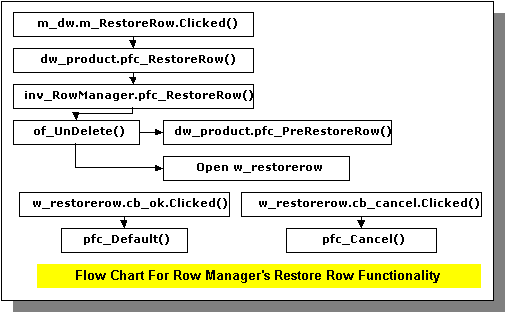
DataWindows' popup menu already has insert/delete/add/restore options. The first three menu options are enabled even if you don't use RowManager service. When you select Restore option�enabled only you delete atleast one row�, PFC displays a dialog box in which you need to select one or more rows to restore. However, it will not restore to the same row position from where it was deleted.
When you restore a deleted row, that row is moved from PFC's internal restore DataStore to the original DataWindow and the status would be it's status before delete. Restoring the row it self doesn't make the row status changed, however, if the row status was DataModified! then it will make the DataWindow changed, in other words, after retrieving the data into the DataWindow, if you delete a row and restore it and close the window, you will not be prompted with 'Save Changes?'. However, if you change a row before you delete it and restore it and close the window, then you will be prompted for saving the changes. Brand new rows�New!�and new rows with data�NewModified!�are not eligible for restoring.
| Home | Previous Lesson: Row Selection Service Next Lesson: Print Service |