| Home | Previous Lesson: Installing the Connection Cache Next Lesson: Creating the Jaguar CTS Component |
Before you start, open the application object product_management_system and save it as pms and close the application painter. The reason is being that, the wizard doesn't like the long application and you will realize it almost at the end of the wizard screens.
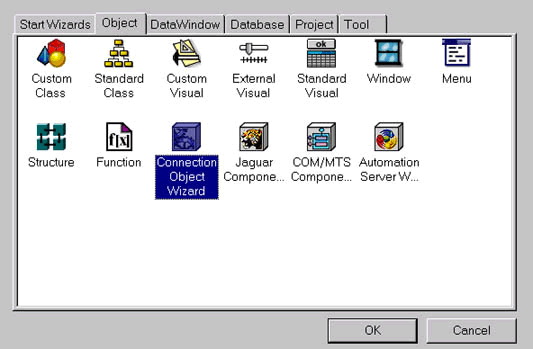
Select File > New menu option and double click on the Connection Object Wizard icon. Click Next and select product.pbl library. The same wizard has the ability to create two type of connection service object. When selected for the database connection, it creates a class user object by inheriting from the NonVisualObject, otherwise, it creates a standard user object inherited from Connection object. The code it generates in both the cases is almost same.
Select Requires Jaguar Connection option. Provide the same Jaguar connection options you provided earlier in the Jaguar Manager. In case you don't remember then, they are: localhost/9000/jagadmin/jagadmin. Choose the Save Login Information in the file. Provide pms for the package prompt. A package is nothing but a collection of components and we want to put these components in the pms package. Name it as n_jag_connection. Select 'Registry Settings' option.
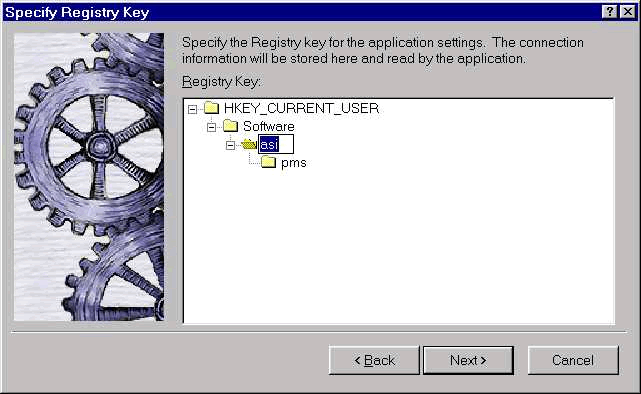
In the next wizard screen, click on Your Company Name key and press F2 and type ASI and press enter. The structure you see in this screen is a defacto standard in the Registry. Check Generate To-Do List option on the next screen and click Finish button.
If you open the Library painter, you will find a new object n_jag_connection object. You don't have to write any code in this object. Let's have a look at what the wizard generated. It created a user object inherited from the Connection object and added a function of_GetConnectionInfo() which gets the connection information from the registry/INI file or returns the values you provided in the wizard.
//*-----------------------------------------------------------------*/
//*    of_GetConnectionInfo:  Get the stored connection information
//*
//*    Note:
//*		The source of connection information can be changed by
//*		 altering the value of the 'is_connectfrom' variable.
//*-----------------------------------------------------------------*/
Choose Case is_connectfrom
	Case IS_USE_INIFILE
   /*  Populate Jaguar Connection from INI file  */
	string ls_inifile = ""
	as_logid	= ProfileString(ls_inifile,"Jaguar","UserID", &
		"jagadmin")
	as_password	= ProfileString ( ls_inifile, "Jaguar", &
				"PassWord", "jagadmin")
	as_server	= ProfileString ( ls_inifile, "Jaguar", &
				"Server", "localhost")
	as_port	= ProfileString ( ls_inifile, "Jaguar", &
				"Port", "9000")
	as_appl	= ProfileString ( ls_inifile, "Jaguar", &
				"Application", "pms")
	Case IS_USE_REGISTRY
    /*  Populate Jaguar Connection from Registry  */
   string ls_registrykey = &
              'HKEY_CURRENT_USER\Software\asi\pms"+"\Jaguar"
	If RegistryGet(ls_registrykey,"UserID",RegString!,as_logid ) <> 1 Then
    RegistrySet ( ls_registrykey, "UserID", RegString!, "jagadmin")
    RegistryGet ( ls_registrykey, "UserID", RegString!, as_logid )
	End If
	If RegistryGet(ls_registrykey,"PassWord",RegString!,as_password) &
                                                        <> 1 Then
	RegistrySet( ls_registrykey, "PassWord",RegString!, "jagadmin" )
	RegistryGet( ls_registrykey, "PassWord",RegString!, as_password )
	End If
	If RegistryGet(ls_registrykey,"Server",RegString!,as_server) <> 1 Then
    RegistrySet( ls_registrykey, "Server", RegString!, "localhost" )
    RegistryGet( ls_registrykey, "Server", RegString!, as_server )
  End If
	If RegistryGet( ls_registrykey, "Port", RegString!, as_port ) &
                                                      <> 1 Then
	RegistrySet( ls_registrykey, "Port", RegString!, "9000" )
	RegistryGet( ls_registrykey, "Port", RegString!, as_port )
	End If
	If RegistryGet ( ls_registrykey, "Application", RegString!, as_appl) &
                                                    <> 1 Then
   RegistrySet ( ls_registrykey, "Application", RegString!, "pms" )
   RegistryGet ( ls_registrykey, "Application", RegString!, as_appl )
 End If
	Case IS_USE_SCRIPT
   /*  Populate Jaguar Connection from Script  */
		as_logid 		= "jagadmin"
		as_password 	= "jagadmin"
		as_server		= "localhost"
		as_port		= "9000"
		as_appl		= "pms"
	Case Else
		Return -1
End Choose
Return 1
That function is called from the Constructor event and used to set the this object properties. So, when you instantiate this object, this code automatically takes care of getting connection information and setting the connection object.
// Event: Constructor
string ls_server, ls_port, ls_logid, ls_password, ls_appl
If of_GetConnectionInfo ( ls_server, ls_port, &
                 ls_logid, ls_password, ls_appl ) = 1 Then
	this.Application  = ls_appl
	this.Driver		= "jaguar"
	this.UserID 	= ls_logid
	this.Password 	= ls_password
	this.Location 	= "iiop://" + ls_server + ":" + ls_port
End If
Close the painter.
| Home | Previous Lesson: Installing the Connection Cache Next Lesson: Creating the Jaguar CTS Component |