| Home | Previous Lesson: Configuring a New Connection Cache Next Lesson: Creating Connection Service Object to Connect to Jaguar CTS Server |
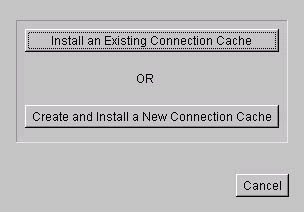
The above procedure just defined a Connection Cache. However, it is not installed. Expand Sybase Central > Jaguar Manager > Servers > Jaguar and you will find Installed Connection Caches folder. Display popup menu on it and select option to install a cache. Click on the 'Install an Existing Connection Cache' and select 'productCache' option and click OK button.
In order to make the installed cache available to Jaguar clients, we need to recycle the Jaguar Server. Disconnect the Jaguar Manager from the Jaguar Server by selecting Tools > Disconnect > Jaguar Manager. Choose Yes when asked whether you are sure to disconnect from the server.
If you have started Jaguar CTS manually, then close it by displaying the popup menu on the Jaguar CTS icon on the task bar and selecting Close option. Bring it back again as explained earlier.
If the Jaguar CTS is started as a service, you have two options, either reboot your machine or stop and start the service. To follow the second method, select Start > Settings > Control Panel and double click on Services icon. Find Jaguar service and click on Stop button. Once it stops, then click on Start button.
Once Jaguar comes up, connect to it from Jaguar Manager and check whether productCache is listed under Installed Connection Caches folder. Display popup menu on productCache and select option to display properties. Click on Ping button to check whether you are able to connect to the product server or not. You should see 'Ping xxxxx successful' message. If not, check the following.
Check the connection now. If not working, disconnect the Jaguar Manager, recycle Jaguar CTS, connect to it again from Jaguar Manage and try it again.
This completes Jaguar Server configuration. The next step would be creating Jaguar components in PowerBuilder, deploy and test them. Minimize Sybase Central.
| Home | Previous Lesson: Configuring a New Connection Cache Next Lesson: Creating Connection Service Object to Connect to Jaguar CTS Server |