To enable the filter service, just write the following line.
dw_product.of_SetFilter( TRUE )
Some programmers write this code in the constructor event of the DataWindow. It would be better to write in the pfc_PostOpen event of the specific window. Following the later method opens the window first and keep executing the script written in the pfc_PostOpen window, since this event is posted instead of triggering. By that user will see the window faster.
If you run the application, PFC displays the standard filter dialog box. Similar to the sort service, PFC has different dialog boxes for the filter service. The following asks PFC to use PFC dialog box.
dw_product.inv_filter.of_SetStyle(1)
The following picture is the result of the above line of code.
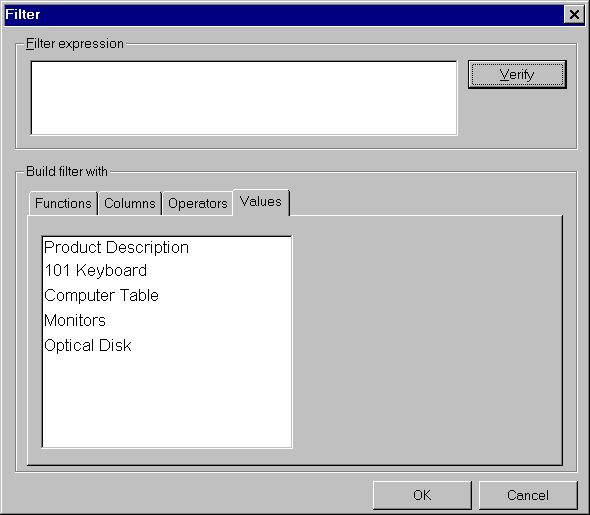
PFC Filter
Dialog Box, Style 1
It’s similar to the PowerBuilder default filter dialog box with one additional thing, "Values". PFC retrieves the distinct values of the column that you selected in the "Columns" tab page. If you have a DataWindow with thousands of rows, don’t use this style, instead choose the default one. PFC retrieves the values in this tab page using the embedded SQL, it doesn’t share the values from the DataWindow. That means, it will take a lot of resources.
 If you set the transaction object of
this DataWindow in a normal way, dw_product.SetTransObject(
SQLCA ),
PFC won’t display values in this tab page.
Set the transaction object using: dw_product.of_SetTransObject(
SQLCA ).
If you set the transaction object of
this DataWindow in a normal way, dw_product.SetTransObject(
SQLCA ),
PFC won’t display values in this tab page.
Set the transaction object using: dw_product.of_SetTransObject(
SQLCA ).
There is one more PFC filter dialog box:
dw_product.inv_filter.of_SetStyle(2)
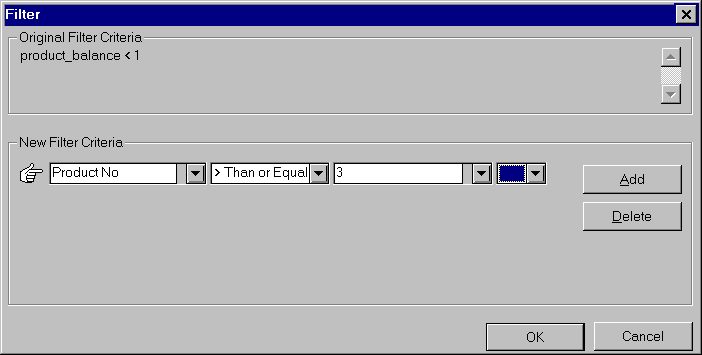
This is DDLB style filter dialog box. There is one advantage and two disadvantages. The good this is, as you type in the third DDLB, PFC finds the nearest/matching value and displays the value in the DDLB. The bad part is that, you can’t select a column name, you can only select the values in the third DDLB. Other bad thing is that, if you type a value, it takes the value in the upper case only.
Similar to the sort service, you have choice of using "column header names"/ "database column names"/ "DataWindow column names". You need to call of_SetColumnnameSource() function. If you want to allow the user filtering only on the visible columns, you can restrict him by calling of_SetVisibleOnly( TRUE ) function.
If you are using a menu that is inherited from the PFC menu, you don’t have to code either in the menu’s clicked event or in the window (other than the code explained above). You also don’t have to define any user-defined events for the purpose of filter service. Also, you don’t have to destroy the filter service that you have created using of_SetFilter( TRUE ) function, PFC takes care of that in the u_dw’s destructor event.