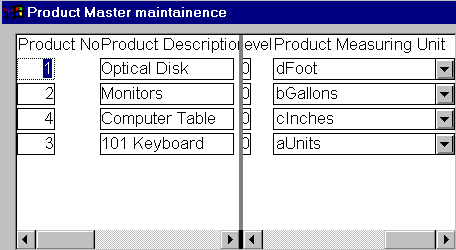
As you know, in DataWindows, when you use edit styles such as DDDW, you can make use of two values. One is data value (stored in the database) and another is the display value. Similarly, when you use editmask edit style, you can use code tables for the same purpose. For example, we are using DDDW edit style for "product_measurement_unit" in the "w_product_master" window. When you sort the DataWindow on a column that is one of above mentioned edit style, PowerBuilder automatically sorts it on the data value. For example, if you sort on the "product_measurement_unit", PowerBuilder sorts on the data value as shown below.
Sorting the
DataWindow on Data Value
In the above picture, we just changed the product_measurement_unit for the demonstration purpose and we also have prefixed one character to the description in the "units" table. Remember, we didn’t change the data value, i.e., "unit" in the "units" table. Then, we sorted the DataWindow on the product_measurement_unit. PowerBuilder sorted the DataWindow on the data values by default. But, for the user who isn’t a PowerBuilder programmer, it looks odd, because, what is sees is not what asked. We need to sort on the display values not on the data values.
Sorting
the DataWindow on the Display Value
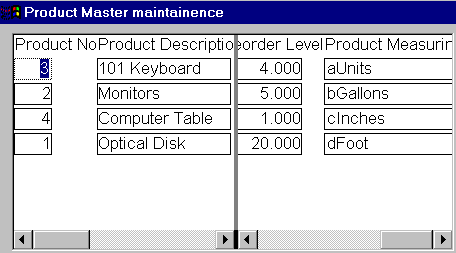
In the above picture, you can see the DataWindow sorted on the display value. How we did this? Just one line of code:
dw_product.inv_sort.of_SetUseDisplay(TRUE)
If you are using a menu that is inherited from the PFC menu, you don’t have to code either in the menu’s clicked event or in the window (other than the code explained above). You also don’t have to define any user-defined events for the purpose of sort service.