| Home | Previous Lesson: Computed Fields Next Lesson: Preview Options: Split Horizontal Scrolling |
You can specify printer parameters for printing a DataWindow in two places: in the design view of the DataWindow painter or in the script before printing. It is a good idea to set up options in the DataWindow painter itself, so that each DataWindow can have its own set of custom parameters.
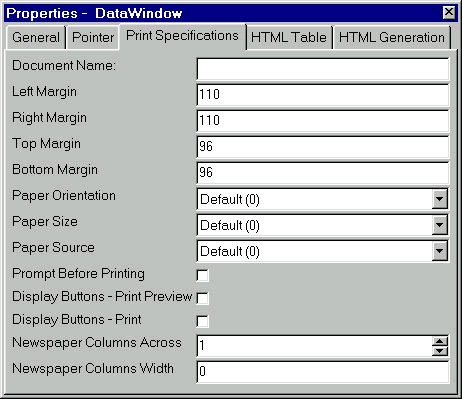
To display the print specifications for a DataWindow, make sure you unselect all options in the DataWindow, i.e., click on non-occupied DataWindow working space in the design view and click on 'Print Specifications' tab page in the properties sheet.
The document name you specify for 'Document Name' will appear in the print queue. Like any other document, it also has a standard margin and paper print options, but the difference is that the margins are in PowerBuilder Units by default. It would be a good idea to specify the paper orientation right in the DataWindow painter at design time instead of leaving it to the user. If you specify here, it prints in the right way by default and the user can always change it at printing time anyway!
Other options are self-explanatory and I don't have to explain them here.
A timer interval is useful when you have computed fields derived that use the TIME() function. It can also be changed here. For example, you can add a computed field to a DataWindow and specify the expression as TIME(TODAY()) to effectively display a clock on the DataWindow. Now all you need to do is change the Timer Interval so that the clock is updated every second, minute or whatever.
| Home | Previous Lesson: Computed Fields Next Lesson: Preview Options: Split Horizontal Scrolling |