| Home | Previous Lesson: Sliding Objects Next Lesson: Print Specifications |
Computed fields allow you to produce very complex expressions using any of the PowerBuilder's built-in functions. For example, the difference between product_balance and product_reorder_level can be done in two different ways.
One method is to place this calculation in the SELECT statement itself. When the computation is part of the SELECT statement, the connected database does the computation and sends the results to the client application, such as a PowerBuilder application.
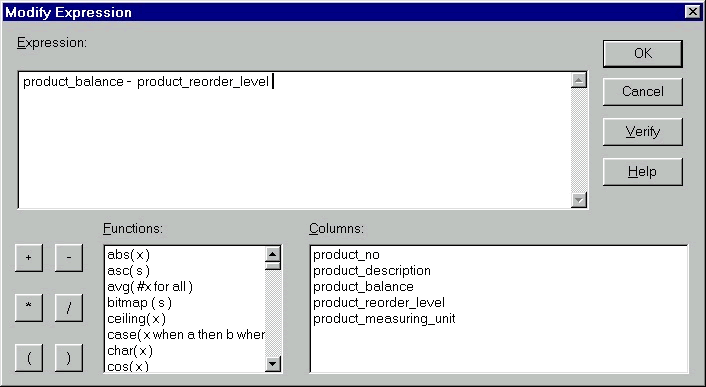
To have client side computations, use 'Computed Fields' feature. Select 'Insert > Control > Computed Field' menu option and click at the point where you want to place the computed field. PowerBuilder prompts for the Computed Field definition as shown in the following picture.
For the above example, give, product_balance - product_reorder_level in the expression box.
Another example for a computed field is the solution for the classic computation, 'divide by zero' error, a big headache in some databases. When a number is divided by a zero, an error occurs. Some databases do not have functions to check and substitute for the zero value if the column has a zero value. You can solve this problem by moving the computations to the client side.
If(col1 > 0, ((col1/col2) * 100), 0)
The above expression says, if the value of col1 is greater than zero, calculate the percentage otherwise, return zero.
| Home | Previous Lesson: Sliding Objects Next Lesson: Print Specifications |