| Home | Previous Lesson: Changing the Record Height Automatically Next Lesson: Computed Fields |
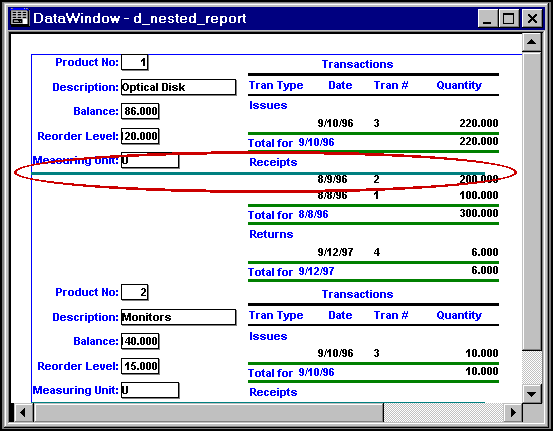
Do you remember placing horizontal line in the 'Nested Reports' topic explained earlier? It is being displayed at wrong place at preview time, as shown in the following picture.
When a report is placed in the detail band, the detail band is set to 'AutoSizeHeight' automatically. Depending on the height of the nested report, the detail band height changes automatically. However, if you place any other object in the detail band, PowerBuilder displays the object exactly at the same place where it was placed.
In the above example, you were expecting the horizontal line to be displayed at the bottom of the record and so placed the line accordingly. However, at run-time the height is changed because of the nested report.
To get the desired results, what you need to do is, go to the properties sheet for the horizontal line and select Position tab. Select 'All Above' option for the 'Slide Up' prompt and preview the report. The horizontal line will be at the place where you wanted it to be.
| Home | Previous Lesson: Changing the Record Height Automatically Next Lesson: Computed Fields |