| Home | Previous Lesson: Print Specifications Next Lesson: Summary |
All the zoom and row description options that were available in the 'Data Manipulation' view in the database Painter are available in the preview view in the DataWindow painter. An extra feature available is the ability to divide the DataWindow into two horizontal areas, which can scroll in the sync mode.
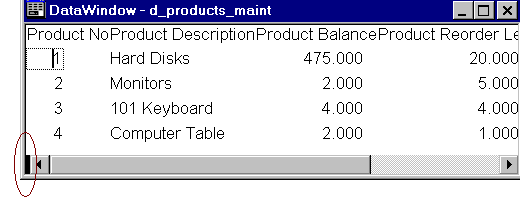
To split a DataWindow move the cursor over the black rectangle at the bottom left hand corner of the DataWindow. When the cursor changes to a double arrow, click and drag it, to position the split.
This feature is most useful when the information is spread across the page and you need to relate something on the far right to something on the far-left side of the page.
| Home | Previous Lesson: Print Specifications Next Lesson: Summary |