| Home | Previous Lesson: The ODBCINST.INI File Next Lesson: The PBODB70.INI File |
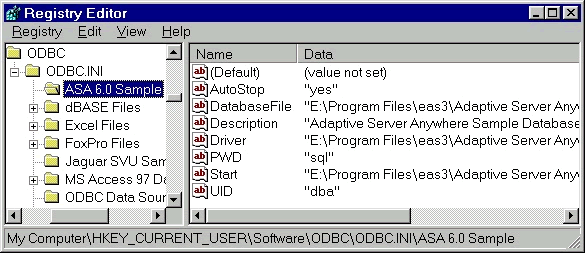
There is another .INI file, ODBC.INI, which we should look at. This is present in the WINDOWS/SYSTEM32 directory and contains full connection information for all databases. Under Windows NT, although it is present for the purpose of backward compatible reasons, the whole information is stored in the registry under HKEY_CURRENT_USER\SOFTWARE\ODBC\ODBC.INI key.
For each of these definitions ODBC.INI has a separate section which contains the complete connection information for that database. This section has the DLL name along with the path. When you specify ODBC as the DBMS in the profile, the ODBC Driver Manager scans this file for the profile name and loads the appropriate driver.
This is probably the most important .INI file. It contains the full information (including passwords) about all your database connections. Considering this it is important that this file is protected on your system and not freely accessible.
A word of caution, it is important that you never try to manually alter any of the entries in any of the .INI files, doing could have a serious effect on your ability to connect to your databases.
| Home | Previous Lesson: The ODBCINST.INI File Next Lesson: The PBODB70.INI File |