| Home | Previous Lesson: ODBC Architecture Next Lesson: The ODBC.INI File |
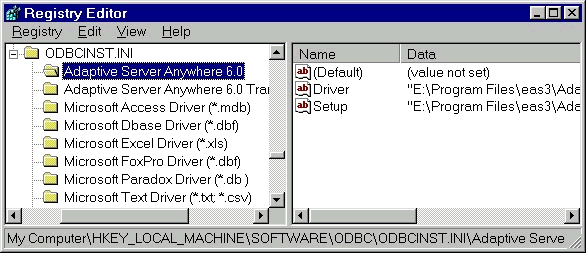
When you first install PowerBuilder, you are prompted to select the ODBC drivers that need to be installed. The selected drivers are installed in the WINDOWS\SYSTEM32 directory contains some ODBC drivers that comes with Windows and other applications. ODBC drivers that come with PowerBuilder are installed in the shared directory under PowerBuilder's home directory. The information about which drivers are installed and their location is stored in HKEY_LOCAL_MACHINE\SOFTWARE\ODBC\ODBCINST.INI key in the registry. On platforms where registry is not available, it is stored in ODBCINST.INI file.
ODBCINST.INI file contains the list of installed drivers gets updated. The '[ODBC 32 bit Drivers]' section of this file contains a list of the installed drivers.
[ODBC 32 bit Drivers]
Microsoft Access Driver (*.mdb) (32 bit)=Installed
Each installed driver has a section in the ODBCINST.INI, which contains the full path name for the required driver:
[Microsoft Access Driver (*.mdb) (32 bit)]
Driver=E:\WINNT\System32\odbcjt32.dll
Setup=E:\WINNT\System32\odbcjt32.dll
DriverODBCVer=E:\WINNT\System32\02.01
32 bit=1
PowerBuilder uses this information to set the driver options when you configure ODBC.
| Home | Previous Lesson: ODBC Architecture Next Lesson: The ODBC.INI File |