| Home | Previous Lesson: ODBC Next Lesson: The ODBCINST.INI File |
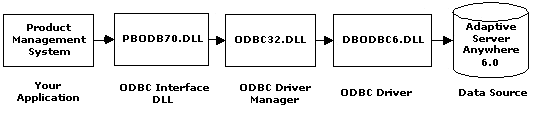
In general the realm of ODBC can be split into four major components:
Each of these components fit together to make a bridge between the two, i.e., application and the data source. Let's look at each of the components in detail.
This is the program that is used to access data from the back-end database, typically running on the MS-Windows Operating system (and the back-end database can be residing on any operating system). When looking at an ODBC setup a PowerBuilder application that accesses data from Sybase Adaptive Server can be considered as the application. Any ODBC functions that you need to call are made from the application.
This is a DLL that controls loading of the necessary drivers to connect to the required database system. When an ODBC call is made from an application, the Driver Manager scans the necessary .INI files to determine which driver to use and where the ODBC driver it is located.
An ODBC driver is a dynamic linked library (DLL) that implements ODBC function calls and is the heart of ODBC. It takes care of network protocols that are required to connect to the data source. It also translates and submits the SQL statements to the data source.
 Note that there are currently three standards for SQL: ANSI '86, ANSI '89 and ANSI '92. This has lead to the proliferation of 'flavors' of SQL and prompted the need for this ODBC translation layer. It is therefore at times necessary for the ODBC driver to translate between these standards for effective communication between the application and the database.
Generally, the back-end database system processes the SQL statements passed to it by the driver, but in the case of text files and some DBMS which don't support SQL, the driver takes care of processing the SQL statements and sends the results back to the application.
ODBC has two types of drivers, Single-tier and Multi-tier drivers. The former process both ODBC functions and SQL statements. An example is one of the Xbase files, a text file or an Excel file, etc.
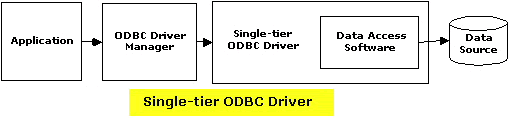
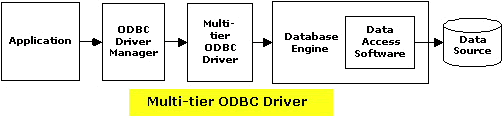
On the other hand, multi-tier driver processes ODBC functions, but sends SQL statements to the database engine for processing. An example includes SQL Adaptive Server, DB2, etc.
To insure a standard level of compliance with the ODBC interface, and to provide a means by which application vendors can determine if a specific driver provides the functions they need, ODBC defines conformance levels for drivers in two areas.
Three API conformance levels to deal with supported ODBC function calls. First level, Core, is a set of core API functions that corresponds to the functions in X/Open and SAG CLI (SQL Access Group Call Level Interface) specifications. Level 1 includes core functions and some more extended functions. Level 2 includes both core and Level 1 and some more extended functions.
Three SQL conformance levels to deal with supported SQL statements and datatypes. First level, Minimum, supports a set of basic SQL statements and datatypes. Second level, Core, includes Minimum as well as some additional SQL statements and datatypes that roughly correspond to X/Open and SAG CLI 1992 specifications. Extended includes both Minimum and Core as well as some extended SQL statements and datatypes that support common DBMS extensions to the SQL.
This is the actual database that contains the data needed by your application. In some cases, it may be simply an ASCII file or an Excel spreadsheet also.
Data source information�such as DBMS name, login name, password, the location of the database to connect to and as well as any DBMS specific parameters�is stored in an ASCII file or in the registry. In the case of Sybase Adaptive Server, you may be specifying the server name, database name, server login ID, password and other DBMS specific information such as application name to display in the server's connection list and so on.
ODBC takes care of finding the SQL Server address on the network and connecting to the SQL Server by looking into the MS-Windows 95/NT registry or sql.ini file.
As an application developer, you only deal with two components: function calls from the application and the data source details. When using PowerBuilder, the data source details are in the database profiles (into which you've already looked).
The interesting feature of ODBC is that you can connect to more than one data source from the application at the same time by simply using another profile.
There are four initialization files on your computer that work with the Powersoft ODBC interface and ODBC driver to make the connection to the specified database.
| Home | Previous Lesson: ODBC Next Lesson: The ODBCINST.INI File |