| Home | Previous Lesson: Defining Primary Keys Next Lesson: Creating Indexes |
A Foreign Key defines the relationship between two tables. We just defined a primary key unit for the units table. For now assume that we have another table product_master which has measuring_unit column. Here every product should be measured in a unit specified in the measuring_unit column. For example, petrol in gallons, wheat in lbs or kilograms, and so on. units table has all the valid measuring units. To define a measuring unit in the product_master table, it should exist in the units table. That means that there is a relationship between product_master and units table.
To define a foreign key, either (You can do the following only after you create product_master table which is explained at the end of this session in the exercises section):
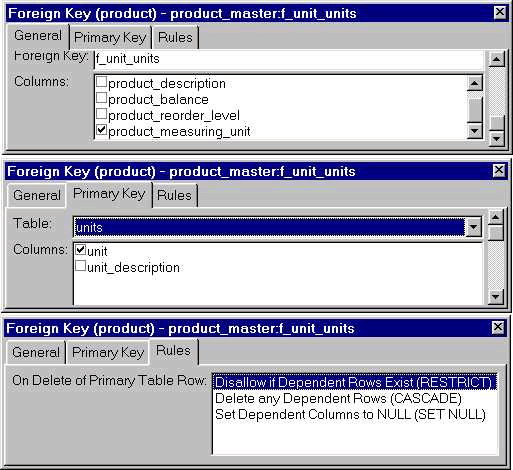
In the Foreign Key sheet, provide a name in the Foreign Key Name prompt. Check the foreign key column product_measuring_unit. Select the units table from the Primary Key tab page and check unit column.
The three options under Rule tab page allow you to specify the effect of deletion of a row in the Primary Table.
|
Option |
Description |
|
Restrict |
If there are dependent rows in the product_master table, database doesn't allow you to delete a row in the units table. |
|
Cascade |
If a row is deleted in the units table, dependent rows in the product_master table are deleted. |
|
Set Null |
If a row is deleted in the units table, then a NULL value will be placed in the product_measuring_unit column of any dependent rows in the "product_master" table. |
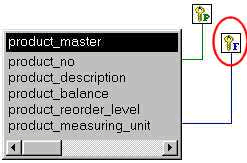
Once you create a foreign key, if you drag product_master table from Objects sheet to Object Layout sheet, PowerBuilder displays product_master table with a foreign key icon. If you would like to browse foreign key details, double click on the foreign key icon (the one that has F on it).
| Home | Previous Lesson: Defining Primary Keys Next Lesson: Creating Indexes |