| Home | Previous Lesson: Error Information Display Window(w_error) Next Lesson: A window to display your application information(w_about) |
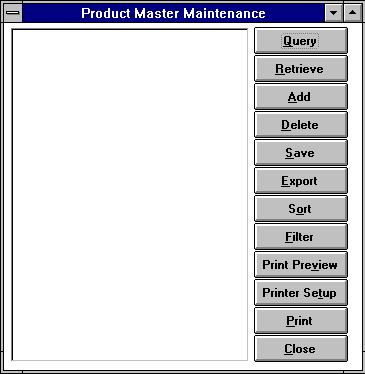
Window Properties for w_product_master window
|
Property |
Value |
|
Title |
Product Master Maintenance |
|
Window Color |
Window Background |
|
Type |
Main |
Left most control is a DataWindow control. Name it as dw_product. All controls that are on the right side are CommandButtons. The names of these CommandButtons from top are cb_query, cb_retrieve, cb_add, cb_delete, cb_save, cb_export, cb_sort, cb_filter, cb_print_preview, cb_printer_setup, cb_print and cb_close. The text values are on the picture. Save this window as w_product_master.
| Home | Previous Lesson: Error Information Display Window(w_error) Next Lesson: A window to display your application information(w_about) |