| Home | Previous Lesson: A Full-featured window(w_product_master) Next Lesson: Menu Painter |
Window Properties for w_about window
|
Property |
Value |
|
Title: |
(Disable Titlebar) |
|
Window Color: |
Window Background |
|
Window Type: |
Response |
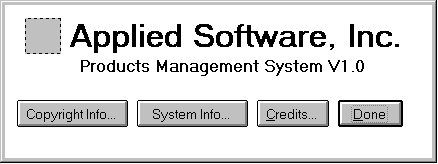
Left Top control is a Picture. Assign your company logo's bitmap. Name it as p_logo. The next two controls are StaticText controls. Provide your company name over there.
The bottom four controls are CommandButtons cb_copyright_info, cb_system_info, cb_credits and cb_done. Turn on both "Default" and "Cancel" properties for cb_done CommandButton. Save this window as w_about.
| Home | Previous Lesson: A Full-featured window(w_product_master) Next Lesson: Menu Painter |