| Home | Previous Lesson: Login Window(w_login) Next Lesson: A Full-featured window(w_product_master) |
Window Properties
|
Property |
Value |
|
Title |
Error Information |
|
Window Color |
Window Background |
|
Type |
Response |
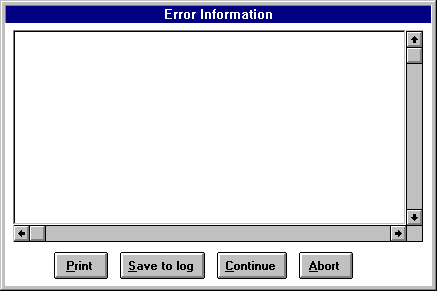
The top control is a DataWindow control. Name it as dw_error. Turn on horizontal and vertical scrollbars.
The bottom four controls are CommandButtons. From left to right, cb_print, cb_save_to_log, cb_continue and cb_abort. The text for the CommandButtons are "&Print", "&Save", "&Continue", "&Abort" in the same order. Save this window as w_error.
| Home | Previous Lesson: Login Window(w_login) Next Lesson: A Full-featured window(w_product_master) |