| Home | Previous Lesson: Window Painter - Exercises Next Lesson: Error Information Display Window(w_error) |
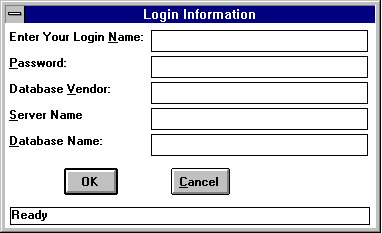
Window Properties for w_login window:
|
Property |
Value |
|
Title: |
Login Information |
|
Window Color: |
Window Background |
|
Window Type: |
Response |
|
Window Name: |
w_login |
Controls left side Top-to-Bottom for w_login window:
|
Control Type |
Name |
Properties |
|
StaticText |
st_name |
Text: "Enter your Login &Name:" |
|
StaticText |
st_password |
Text: "&Password:" |
|
StaticText |
st_dbms |
Text: "Database &Vendor:" |
|
StaticText |
st_server |
Text: "&Server Name:" |
|
StaticText |
st_database |
Text: "&Database Name:" |
|
CommandButton |
cb_ok |
Text: "OK" Turn on "Default" property Tab Order: 60 Tag: "Either hit Enter key or click this button to validate your login." |
Controls right side Top-to-Bottom in w_login window:
|
Control Type |
Name |
Properties |
|
SingleLineEdit |
sle_name |
Turn-on AutoHScroll Accelerator: "N" Limit: 32 Case: Any Border: Box Tab Order: 10 Tag: "Enter Login name. Login name is case sensitive. Check your CapsLock." |
|
SingleLineEdit |
sle_password |
Turn-on AutoHScroll Accelerator: "P" Limit: 32 Case: Any Border: Box Turn-on Password property Tab Order: 20 Tag: "Enter Password. Password is case sensitive. Check your CapsLock." |
|
SingleLineEdit |
sle_dbms |
Turn-on AutoHScroll Accelerator: "V" Case: Any Border: Box Tab Order: 30 Tag: "Enter Database vendor name. Enter "ODBC", if you want to use ODBC driver." |
|
SingleLineEdit |
sle_server |
Turn-on AutoHScroll Accelerator: "S" Case: Any Border: Box Tab Order: 40 Tag: "Enter Server name." |
|
SingleLineEdit |
sle_database |
Turn-on AutoHScroll Accelerator: "D" Case: Any Border: Box Tab Order: 50 Tag: "Enter Database name." |
|
CommandButton |
cb_cancel |
Text: "&Cancel" Turn on "Cancel" property Tab Order: 70 Tag: "Click or Press Esc key, to cancel Login and to exit the application." |
The bottom most control is a StaticText control. Name it as "st_help". Value of text is: "Ready". For all StaticText controls, select background color as "Window Background" color (Marked as "W" on the toolbar icon).
| Home | Previous Lesson: Window Painter - Exercises Next Lesson: Error Information Display Window(w_error) |