| Home | Previous Lesson: Horizontal and Vertical Trackbars Next Lesson: PictureListBox |
You might have seen wide variety of Progressbar controls while installing various software installations. You can use a progress bar to indicate the progress of a lengthy operation. Depending on your need you can use either horizontal or vertical Progressbar. The Progressbar control is a rectangle that fills with the system highlight color as the operation progresses.
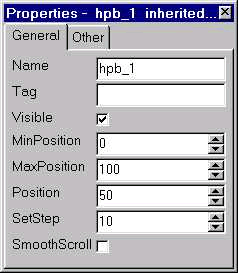
MinPosition and MaxPosition are similar to the one explained in Trackbar controls' properties and are default to 0 and 100 respectively. SmoothScroll specifies that the control displays as a smooth scrolling bar instead of the default segmented bar. By calling the StepIt() function In the script, we can display the progress of the operation. Alternately, you can also set the Position property.
| Home | Previous Lesson: Horizontal and Vertical Trackbars Next Lesson: PictureListBox |