| Home | Previous Lesson: Horizontal and Vertical Scrollbars Next Lesson: Horizontal and Vertical Progressbars |
These two controls are introduced with v7.0. Like a scroll bar, a Trackbar is used as a scrolling control, but clicking on the Trackbar slider moves it in discrete increments instead of continuously.
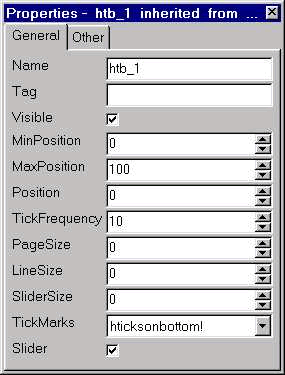
MinPosition specifies the value when the slider is at the left/ bottom edge of the Trackbar respectively. MaxPosition specifies the value when the slider is at the right/ top edge of the Trackbar respectively. Position specifies the position of the slider in the Trackbar. PageSize specifies how much the slider should move when the user press Page keys or clicks on the track, but not on the slider itself. The default is (MaxPosition - MinPosition) / 5, meaning pressing Page Down key five times moves the slider all the way from one side to the other. LineSize specifies how much the slider should move when the user presses the Arrow keys.
You can turn the slider on or off, but I don't see any need of turning it off. TickMarks property specifies where you want to display the tick marks for the Trackbar.
| Home | Previous Lesson: Horizontal and Vertical Scrollbars Next Lesson: Horizontal and Vertical Progressbars |