| Home | Previous Lesson: MultiLineEdit Next Lesson: DropDownListBox |
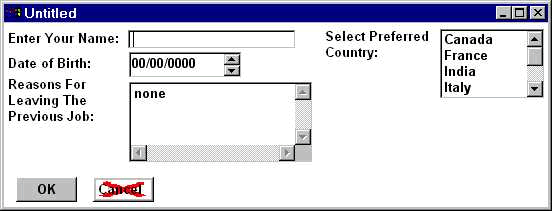
A ListBox control is used to display a list of options from which the user can select one or more. Our example shows a list of countries with a vertical scrollbar to scroll through the list. You select from the list by clicking on one of the countries. By looking at the properties of the control, you can see that we've typed in the options that we want to be displayed in the Items box:
The list of options is in the order in which we typed them, but when you previewed the window, you may have noticed that the list was in alphabetical order, because we've checked the Sorted property.
The DisableNoScroll property, when turned off will automatically turn off the vertical scrollbar, if there is enough room in the control to display all options. Turn on this property if you want to display the scrollbar all the time, but disable scrolling when all items are visible.
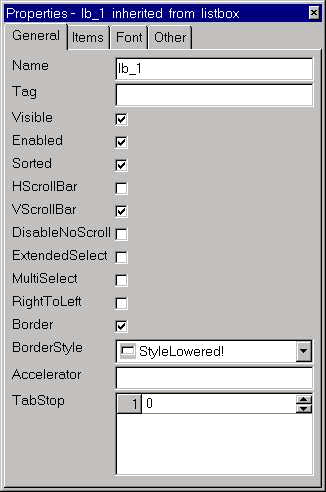
There are two ways to allow a user to select more than one choice from a list. Checking the MultipleSelections property allows any number of options from the list to be selected by clicking on them. Clicking on a selected option will then deselect it.
In MS-Windows environment, you can select a range of files using Shift and left mouse button together. Similarly you can select random files using Ctrl key and left mouse-button together. You can give the same functionality to the user by enabling the ExtendedSelect property.
The Tabs property specifies the position to stop within the ListBox, in terms of characters, whenever user press Tab within the control. You can specify up to 16 tab stop positions. We neither saw it working nor found it is useful in any application.
Typically a ListBox is used when you want to display more than two and less than five multiple choices. If it is only two choices, you can use RadioButton, but if it were more than two, using them would occupy most of the screen. In those cases it would be better to use a ListBox. Using DropDownListBox would be better choice if the options are more than five and multiple selections are not required.
| Home | Previous Lesson: MultiLineEdit Next Lesson: DropDownListBox |