 icon. At this time, the application that is opened (active)�you can see the name of the current application on PowerBuilder main window title bar�is "example ", that comes with PowerBuilder software.
| Home | Previous Lesson: Creating a Library Next Lesson: Writing "Hello, World!" Application |
Application object is the entry point of an application. For each application you create, you need to have an application object (You can keep multiple Application objects in one library, if you need so). Similarly, for "Product Management System" we need to have an application object. Let's create one with the same name.
You need to invoke the application object painter by clicking on the icon. At this time, the application that is opened (active)�you can see the name of the current application on PowerBuilder main window title bar�is "example ", that comes with PowerBuilder software.
 icon (Please note that, at anytime you see a star on an icon, it means that clicking on that icon allows you to create a new object) or select File > New from the menu.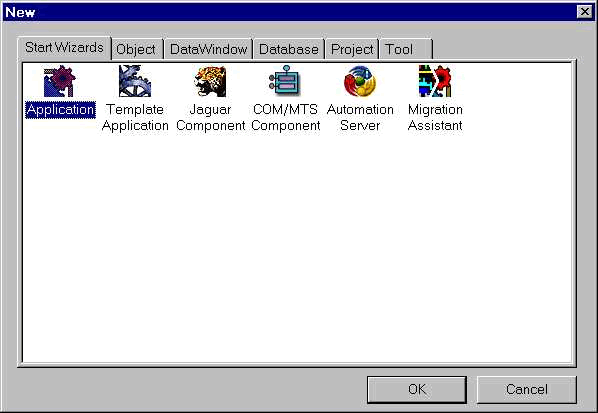
This is the standard dialog box you see throughout the PowerBuilder development environment for creating a new object. Double-click on the Application icon under the 'Start Wizards' tab page. Unlike earlier versions, most of these options start wizards to guide you in the creation of the selected object by asking you few questions at a time.
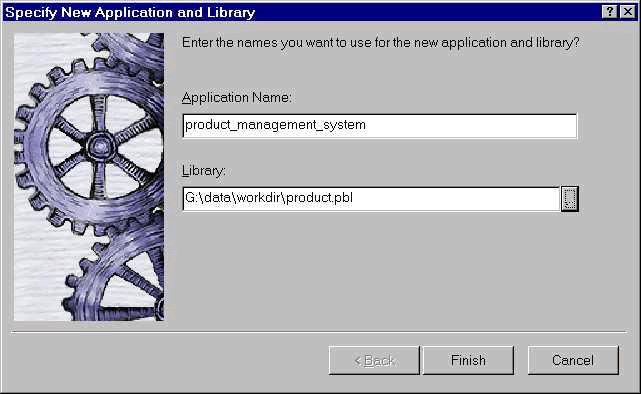
Provide product_management_system for 'Application Name' prompt. As explained earlier, every object you create in PowerBuilder, you need to store it in a PowerBuilder library. Same is the case with an Application object. You need to select a library name in which you want to store the new application object. Select product.pbl, which you created previously. Click Finish button.
If you select 'Application Template' icon instead of 'Application' icon, PowerBuilder creates a template application depending on the options you choose in the wizard. The following picture displays all the steps involved in creating an application. In earlier versions, you have no option to specify names or application type or connectivity options. We didn't choose that route since our application we need in this session is lot more simple than that.
Now you see the new application named product_management_system on the window title bar, indicating it as the active application.
| Home | Previous Lesson: Creating a Library Next Lesson: Writing "Hello, World!" Application |