
| Home | Previous Lesson: MDI Basics Next Lesson: Opening an Instance of a Window |
The first and most obvious thing to remember when converting single window application to MDI version is, that you have to create a MDI Frame window. Invoke the window painter and create a new window. Then invoke 'window properties' dialog box by double-clicking in the windows work space. Select the "Window Type" as "MDI Frame with Microhelp". Provide "Product Management System" for the "Title" prompt and "m_mdi_menu" for the "Menu" prompt. We hope that you painted "m_mdi_menu" in the Menu Painter session, otherwise, revisit that session.
|
For a window of type 'MDI Frame' or 'MDI Frame with microhelp' you must provide the menu name at painting time, otherwise, you can't save the window. |
We could paint objects on the window, but as we said before, if you do that you have to write script for the resize event. For now, let's continue with the standard MDI Frame.
After logging into our application, we now want to open MDI window rather than w_product_master. We also want to allow the user to open w_product_master as a sheet within the MDI Frame, when he selects 'Module/Product Master Maint.' option from the menu. Invoke the application painter, go to the script painter and for the open event, replace the line:
open( w_product_master )
to:
open ( w_mdi_frame )
Now run the application. You will see an empty window along with a menu and a toolbar:
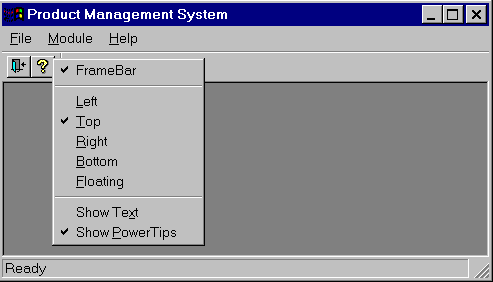
Clicking right mouse button on the toolbar will display the right-click menu allowing you to position it, close it or show the associated text.
This menu is similar to the one displayed in the development environment, which allows you to re-position the Painterbars. PowerBuilder provides this default behavior for no additional code.
Since, you have not coded anything for the menu option events, you can't open "w_product_master" window from the menu at this point. Double-click on the control menu to close the application.
| Home | Previous Lesson: MDI Basics Next Lesson: Opening an Instance of a Window |