| Home | Previous Lesson: Error Service - e-Mail Notifications Next Lesson: Debug Service |
If you decide not to display error messages (such as unattended batch jobs), you can call the following function to suppress error messages.
inv_Error.of_SetUnattended(TRUE)
In the unattended mode, of_Message() function returns the default button number defined in the error message definition.
You can ask PFC error message to log the error messages. Write the following in the pfc_open/pfc_SystmError event of n_cst_AppManager:
inv_Error.of_SetLogFile("product.err")
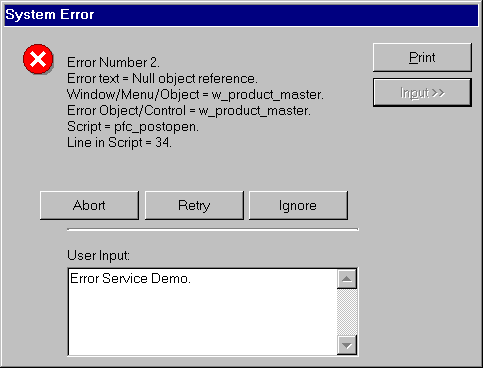
The logged message looks like this:
DateTime: 9/19/96 13:47:46 Title: System Error Message: Error Number 2.
Error text = Null object reference.
Window/Menu/Object = w_product_master.
Error Object/Control = w_product_master.
Script = pfc_postopen.
Line in Script = 34. User: Comments:
When you set the "InPut" field to Yes, PFC displays an input box and allows the user to enter the comments. PFC logs the comments also.
You can restrict the messages that are being logged depending on the severity level.
inv_Error.of_SetLogSeverity(0)
If you want to close the error message dialog box after a specified time limit and take the default action specified in the error message definition, then set the time out as shown below:
inv_Error.of_SetTimeOut(60)
| Home | Previous Lesson: Error Service - e-Mail Notifications Next Lesson: Debug Service |