| Home | Previous Lesson: Structured Storage System Next Lesson: Opening From the Nested Storage |
In the above example, we have stored the sub-storage up to one level. The following example shows saving a sub-storage in a sub-storage.
OLEStorage lOLEStorage1, lOLEStorage2, lOLEStorage3
Integer lResult
lOLEStorage1 = Create OLEStorage
lOLEStorage2 = Create OLEStorage
lOLEStorage3 = Create OLEStorage
lResult = ole_control1.Open( "c:\workdir\3.doc" )
If lResult <> 0 Then goto CompleteExecution
lResult = lOLEStorage1.Open( "c:\workdir\1.ole" )
If lResult <> 0 Then goto CompleteExecution
lResult = lOLEStorage2.Open( "Months", StgReadWrite!, &
			StgExclusive!, lOLEStorage1 )
If lResult <> 0 Then goto CompleteExecution
lResult = lOLEStorage1.Save()
If lResult <> 0 Then goto CompleteExecution
lResult = lOLEStorage3.Open( "Dates", StgReadWrite!, &
			StgExclusive!, lOLEStorage2 )
If lResult <> 0 Then goto CompleteExecution
lResult = ole_control1.SaveAs( lOLEStorage3, "3.doc" )
If lResult <> 0 Then goto CompleteExecution
CompleteExecution:
lOLEStorage1.Close()
lOLEStorage2.Close()
lOLEStorage3.Close()
Destroy lOLEStorage1
Destroy lOLEStorage2
Destroy lOLEStorage3
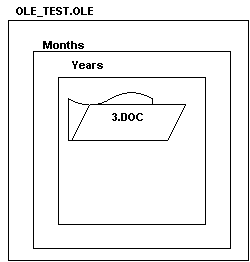
This example does not make use of streams, to make the example more simple. After executing the script, the internal storage looks as shown in the following picture.
Saving the nested storage is like transactions. In a transaction, unless you commit the outer-most transaction, the transaction is not complete. For example,
Begin Tran Tran1
Begin Tran Tran2
�
�
Commit Tran Tran2
This doesn't complete the transaction, However calling "Commit Tran Tran1" instead of "Commit Tran Tran2" will commit all the nested transactions. Saving nested sub-storages also similar to this. You need call Save() for the root storage file, not for the sub-storages.
| Home | Previous Lesson: Structured Storage System Next Lesson: Opening From the Nested Storage |