Mastering PowerBuilder
Displaying HTML page from PowerBuilder using HTML Get method
Till now we were displaying the HTML page in a browser. As you may already know, there
are many internet sites running CGI (Common Gateway Interface) programs, to display
dynamic HTML pages. CGI programs can be written using any language, for example, C, Shell
Script, Perl, COBOL, and so on. These programs often take parameters to display a web
page. For example, when you visit Yahoo at
http://www.yahoo.com and search for a keyword, a CGI program takes the keyword and other preferences
you specify and processes the query and displays the result in the HTML page. Another good
example is when you click on the 'Next', 'Previous' buttons on this page. Knowingly or
unknowingly you are invoking CGI programs and sending parameters.
Can we call these CGI programs and send parameters to it from a PowerBuilder program?
Can we process the resulted HTML web page? The answer to it is
Yes.
CGI programs are called using
GET, POST or PUT methods. Among these, the first two are
popular. The major difference between these two methods is that the former one takes
parameters whose total length doesn’t exceed 255 characters, where as the later one
allows long text. And also the method of accessing parameters in CGI programs for these
two methods vary. For example, if you are using Perl on UNIX, you can access parameters
for the GET method in the environment variables, for POST method as standard input. Going into details is beyond the scope of these
courses.
Now, let‘s learn about calling these CGI programs from within the PowerBuilder
application.
// Object: cb_get CommandButton in w_context window
// Library: product_web.pbl
// Event: Clicked
Inet iinet_1
nc_internet_results iir_Results1
This.GetContextService("Internet",
iinet_1 )
iir_Results1 = CREATE nc_internet_results
iinet_1.GetURL( "http://www.applied-software.com/index.cgi", iir_Results1 )
This code introduces a new class
InternetResult. This
class has no properties and has three methods GetContextService(), InternetData() and InternetStatus(). You will never use this class directly, instead you need to create a descendent
of this class and override the InternetData() method. This
method is defined in the InternetResult class as a
placeholder to avoid compilation errors. The descendent class 'iir_Results1' in the above
example is automatically called by GetURL() function and
the InternetData() function is fired. You need to define InternetData() function as shown below:
Name:
InternetData()
Returns: Integer
Access: Public
Parameter: 'Data' datatype 'BLOB' passed by value
GetURL() function sends the HTML web page as a BLOB object to
this function. Within the function, you can convert it to a string and process it
according to the business needs. In this example, we are just displaying the HTML page
using the MessageBox() function. The following is the code
for the over written InternetData() function:
// Object: nc_internet_results inherited from
// InternetResult standard class
// Function Name: InternetData()
MessageBox("Returned
HTML", String(data))
Return 0
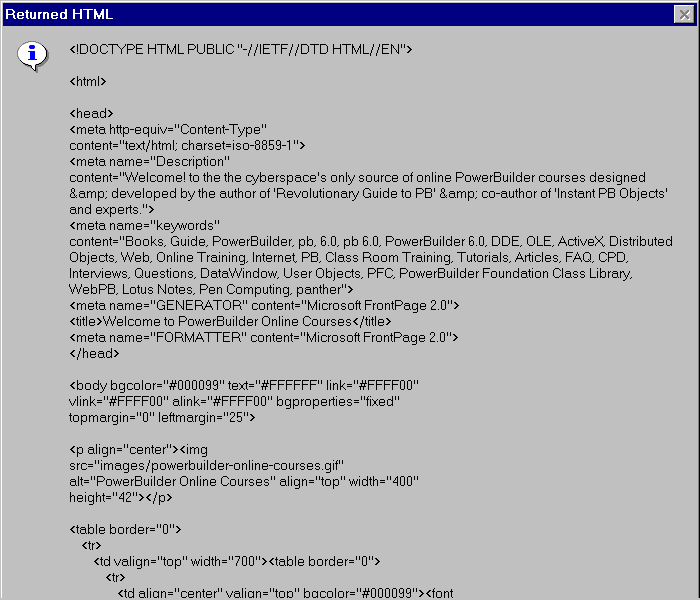
The following is the partial message box when
http://www.applied-software.com/index.cgi is accessed. If you run the above URL from your browser command line and browse
the source code (View/Source menu option in most browsers), you will see the code similar
to the one in the following message box.
Actually, the above CGI program 'index.cgi' doesn’t take any parameters. So, even
if you send any, the CGI program will ignore it. Unlike other examples for displaying the
HTML page, this method gives the HTML code directly to the PowerBuilder program, and it
doesn’t open in any browser. It means that your PowerBuilder program is acting like a
web client (web browser). It is up to you to decide what to do with the HTML code.