Mastering PowerBuilder
Getting Environment Information at Run Time
In the previous section we were able to find exactly where your application was
running. In this section let’s see how to read the environment variable values. Here
we need to use
ContextKeyword class. The following example
uses this class along with the previous class and reads the environment variable
information:
// Object: cb_env_info CommandButton w_context window
// Library: product_web.pbl
// Event: Clicked
String ls_ShortName, ls_Env[],
ls_Str
ContextInformation lcx_Info
ContextKeyword lcx_EnvInfo
// Instantiate Context Service
This.GetContextService( "Keyword", lcx_EnvInfo )
// Instantiate Context Service
This.GetContextService( "ContextInformation", lcx_Info )
//Get context information by
calling various functions.
lcx_Info.GetShortName( ls_ShortName )
// Check whether the runtime
environment is window Plug-in
// before accessing Netscape's EMBED tag attributes.
If Upper(ls_ShortName) = "PBWINPLUG-IN" Then
lcx_EnvInfo.GetContextKeywords( "HEIGHT", ls_Env )
If UpperBound( ls_Env ) > 0 Then ls_Str = "Height: " + ls_Env[1]
lcx_EnvInfo.GetContextKeywords( "WIDTH", ls_Env )
If UpperBound( ls_Env ) > 0 Then ls_Str += "~r" + "Width:
" + ls_Env[1]
lcx_EnvInfo.GetContextKeywords( "WINDOW", ls_Env )
If UpperBound( ls_Env ) > 0 Then ls_Str += "~r" + "Window
name: " + ls_Env[1]
lcx_EnvInfo.GetContextKeywords( "SRC", ls_Env )
If UpperBound( ls_Env ) > 0 Then ls_Str += "~r" +
"PowerBuilder Library: " + ls_Env[1]
End If
lcx_EnvInfo.GetContextKeywords(
"PATH", ls_Env )
If UpperBound( ls_Env ) > 0 Then ls_str += "~r" + "Path: " +
ls_Env[1]
If IsNull( ls_Str ) Then ls_Str = "Environment Info not found!"
MessageBox( "Environment Info", ls_Str )
We are initializing the
ContextKeyword class, similar to
the one we did in the previous section. Please note that we are also initializing ContextInformation class to find where the application is running. Then, we are calling GetContextKeywords() function to get the value of the specified environment variable. This service is
good, however, if you want to write values of all environment variables, you can't do it
with this function, because you need to know the environment variable name before calling
this function. The second argument to this function is a string array. If the specified
environment variable exists, it populates the array from element 1 onwards, otherwise, no
element is added to the array. That's why, it is a good idea to check the number of
elements an array has by using the UpperBound() function,
before accessing any element.
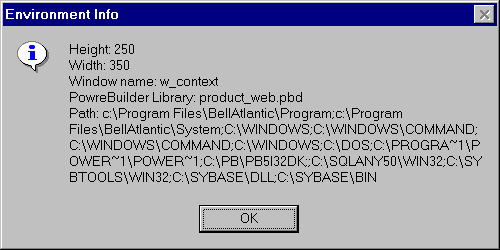
The first four variables you see in the above picture are the parameters specified in
the
EMBED tag in the HTML code for the Netscape Navigator.
However, you can't access in The other environment variable is PATH.