| Home | Previous Lesson: Course 3:: Session 29 :: Page 160 Next Lesson: Course 3:: Session 29 :: Page 180 |
Getting Context Information at Execution Time
With version 6.0, Powersoft introduced few more classes to access and execute time environment information. Using these classes you can find where your application is running --such as native runtime, ActiveX control, window Plug-in, etc.. You may want to do different things depending on the environment. For example, you may want to take advantage of Internet Explorer's ActiveX interface to navigate between different HTML pages, or you may want to display HTML pages using the default browser.
The two new classes are
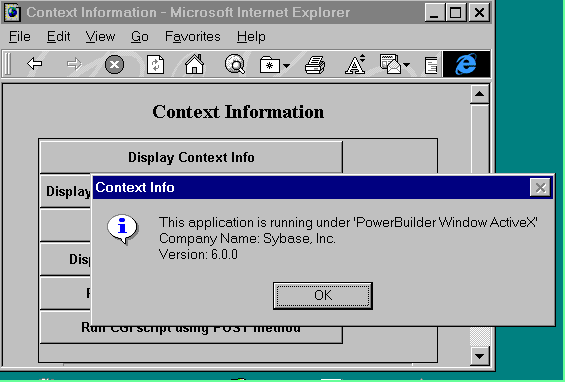
ContextInformation and ContextKeyword. The following example makes use of ContextInformation object and displays the context sensitive information.// Object: cb_context_info CommandButton in w_context window
// Library: product_web.pbl
// Event: Clicked
String ls_Name, ls_Str,
ls_ShortName
String ls_CompanyName, ls_VersionName
Integer li_MajorVer, li_MinorVer, li_FixVer
ContextInformation lcx_Info
// Instantiate Context Service
This.GetContextService( "ContextInformation", lcx_Info )
//Get context information by
calling various functions.
lcx_Info.GetName( ls_Name )
lcx_Info.GetShortName( ls_ShortName )
lcx_Info.GetCompanyName( ls_CompanyName )
lcx_Info.GetVersionName( ls_VersionName )
lcx_Info.GetMajorVersion( li_MajorVer )
lcx_Info.GetMinorVersion( li_MinorVer )
lcx_Info.GetFixesVersion( li_FixVer )
ls_Str = "This application is running under '" + ls_Name + "'"
ls_Str += "~r" + "Company Name: " + ls_CompanyName
ls_Str += "~r" + "Version: " + ls_VersionName
// Adding Major, Minor and
Fix versions separated by period After declaring variables, we are instantiating 'ContextInformation' object by calling
// is equal to VersionName
// ls_Str += "Version: " + String( li_MajorVer ) + "." + &
// String( li_MinorVer ) + "." + String( li_FixVer )
MessageBox( "Context Info", ls_Str )
GetName() returns the environment in which your application is running.
| Environment | Return Value by GetName() |
| Native | PowerBuilder Runtime |
| Plug-in | PowerBuilder Window Plug-in |
| ActiveX | PowerBuilder Window ActiveX |
GetShortName() also returns the same, however in abbreviates.
| Environment | Return Value by GetShortName() |
| Native | PBRun |
| Plug-in | PBWinPlug-in |
| ActiveX | PBRTX |
The documentation says GetShortName() returns PBRTX while running under ActiveX control, but it is not correct. For version 6.0, you will get PBRX60.
GetVersionName(), as the name says returns the PowerBuilder
version, 6.0.0 for PowerBuilder 6.0. The later three functions return major (6), minor (0)
and fix (0). Fixes version is the number after the last decimal from left. Minor version
number is the number between two decimals.
| Home | Previous Lesson: Course 3:: Session 29 :: Page 160 Next Lesson: Course 3:: Session 29 :: Page 180 |