| Home | Previous Lesson: Course 3:: Session 29 :: Page 140 Next Lesson: Course 3:: Session 29 :: Page 160 |
Window ActiveX Control
Similar to the window Plug-in for Netscape, PowerBuilder has n Window ActiveX control for Internet Explorer. The user should have the Window ActiveX control (PBRX60.OCX) in the path or in the windows system directory. Later (s)he needs to register the Window ActiveX control. Similar to the OLE control, each ActiveX control has a class id, and this needs to be registered in the windows registry.
Registration can be done from within PowerBuilder. To do this, open a window and select Controls/OLE 2.0 control from the menu. Select
Insert Control tab page and click on Register New button. Select PBRX60.OCX control and click on Open button. PowerBuilder registers the control. Now, you can browse OCX control properties and note down class id. You use the class id in the HTML code.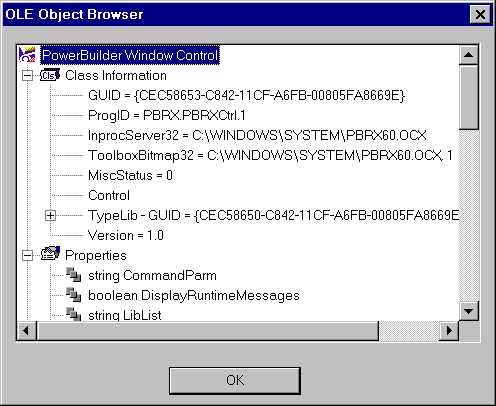
The following is the HTML code used to display PowerBuilder the 'w_product_maint' window in the Internet Explorer.
// File: window-activex.html
<HTML><TITLE>Product Management System</TITLE><CENTER>
<H2>Product Management System<BR>(using Window ActiveX control in
IE)</H2><BODY>
<OBJECT NAME="PBRX1" WIDTH=500 HEIGHT=325
CLASSID="CLSID:CEC58653-C842-11CF-A6FB-00805FA8669E">
<PARAM NAME="_Version" VALUE="65536">
<PARAM NAME="_ExtentX" VALUE="5962">
<PARAM NAME="_ExtentY" VALUE="2164">
<PARAM NAME="_StockProps" VALUE="0">
<PARAM NAME="PBWindow" VALUE="w_product_maint">
<PARAM NAME="LibList"
VALUE="http://www.applied-software.com/pbo/product_web.pbd;">
<PARAM NAME="PBApplication" VALUE="product_management_system">
</OBJECT></BODY></HTML>
You need to use
OBJECT tag for Internet Explorer instead of the EMBED tag we used for the Netscape Plug-in. The name you specify for the NAME tag is useful when referring to this object (PowerBuilder window) in the browser script using JavaScript or VB Script scripting language. The name you provide to this tag has no affect on the PowerBuilder window you are deploying. WIDTH and HEIGHT specifies the dimensions that Internet Explorer allocates for this ActiveX control. You need to provide the class id, which you noted down in the previous step to the CLASSID tag with CLSID: prefix.The other tags like
PARAM are the tags used to send parameters to the ActiveX control. You need to specify the name of the parameter using the NAME sub tag and the value of that parameter using the VALUE sub tag. Among these, few are important. PBWindow specifies the child window you want to open in the ActiveX control. LibList specifies the PowerBuilder dynamic libraries that are required to run this window. For example, you may be using a DataWindow control in the window or open other child windows from this window and need to place all those objects in the PBDs specified in the LibList parameter. You can specify multiple libraries separated by semicolon.If you need to send command line parameters to the application, you can make use of
COMMANDPARM parameter and access those values in the window by calling the CommandParm() function.If you are opening the child window from the application object, you need to specify the 'PBApplication' parameter and the application name. Please note that only the 'Open' event of the application object is fired, and no other events are executed. You may want to move all the application initialization logic to window's open event or place the logic in a user-defined event and trigger that event from the child window's open event. The child window's Open event fires after firing the constructor event for all the controls that are placed in the child window. Your child window can access any declared global variable. If you don’t have any logic in the application object's open event, you need not specify the 'PBApplication' parameter.
If you would like your users to see any execution time errors, you can specify
DISPLAYERRORS with TRUE value.| Home | Previous Lesson: Course 3:: Session 29 :: Page 140 Next Lesson: Course 3:: Session 29 :: Page 160 |