| Home | Previous Lesson: Deploying DataWindows as plug-ins Next Lesson: Course 3:: Session 29 :: Page 150 |
Deploying Windows
Window Plug-in
You can deploy a PowerBuilder window as a plug-in, similar to a DataWindow plug-in deployment. However, you can only deploy child type window as a plug-in. Unlike DataWindow plug-in deployment, the end-user should have the PowerBuilder run-time DLLs installed on his machine and have it in the PATH. The end-user should have "
nppba050.dll" (nppba60.dll for version 6.0 deployment) in the Netscape’s plug-in directory and add "pbd" MIME type to the Netscape. Follow the steps explained in the "DataWindow plug-in session". Create Application/PowerBuilder instead of Application/x-report.You can’t have any global variables since, there is no application object. Any code that you write in the child window runs locally. That means, if you are reading a .INI file, the file should be located locally on the end-users machine. Similarly, any database access you do in the application should also be local. There are three extra options in the
EMBED tag for the PowerBuilder window plug-in.WINDOW: The class name of the window to be created from the provided library list.
LIBRARY: Include one entry for each additional library to be made available for the plug-in window. As with the SRC keyword, it must be an URL.
COMMANDPARM: Include the string you want to pass to the window. To access this string from within the window, call the
CommandParm() function.The following picture is a child window with a DataWindow control and two CommandButtons. In the window 'Open' event, SQLCA is initialized and connected to the database. Please recall that all database accesses are local only. You can't access a database on the internet directly from a PowerBuilder window (actually, you can access database on the internet using distributed PowerBuilder and web.pb, which are explained later). The 'Retrieve' button is retrieving data into the DataWindow using the
Retrieve() function. You can open response windows from this child window if necessary (just to demonstrate this, we put a MessageBox() function in the beginning of the Open event). The Cancel button's clicked event is calling the HALT statement. While browsing this window in the browser, you click on the 'Cancel' button, the window will close and you don't see anything in its place.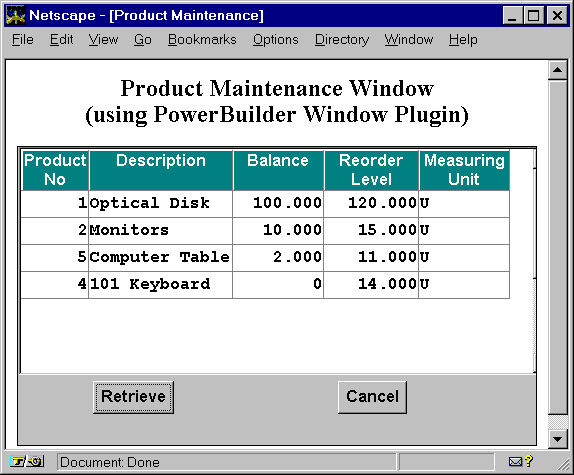
The following is the HTML code written to display the window.
// File: window-Plug-in.html
<HTML><TITLE>Product Maintenance</TITLE><BODY><Center><H2>Product Maintenance Window<BR>(using PowerBuilder Window Plug-in)</H2>
<EMBED SRC="http://www.applied-software.com/pbo/product_web.pbd" WIDTH=520 HEIGHT = 300 WINDOW="w_product_maint"></BODY></HTML>
What will happen if you define the as a 'Main' window? Well, nothing happens. No error is generated, similarly nothing will be displayed in the browser window.
| Home | Previous Lesson: Deploying DataWindows as plug-ins Next Lesson: Course 3:: Session 29 :: Page 150 |