Like any other service, you need to turn on the service before you use the service:
dw_product.of_SetRowSelect( TRUE )
Now, you need to select the style.
dw_product.inv_rowselect.of_SetStyle(2)
When this service is enabled, by default, PFC selects only one row at any point of time. Passing 1 as parameter will select the clicked row, clicking on the selected row again will deselect the selected row. If you want to allow the user selecting multiple rows with the help of SHIFT or CTRL keys (called as Extended Select), you need to select style 2.
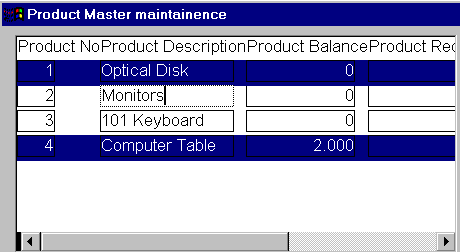
PFC's
Multiple Row Selection
If your application needs, you can add a menu option to allow the user to invert the selection as shown below:
dw_product.inv_RowSelect.of_InvertSelection()
As explained earlier, after selecting multiple rows, if the user invokes the popup menu and selects Delete option, PFC doesn’t delete all the selected rows, instead, it deletes only the last selected row.