Powersoft started supporting three/n-tier Client/Server model since version 5.0. It introduced few things for this model support. In this section, let’s have an overview of all the new objects that are introduced to supporting distributes computing model.
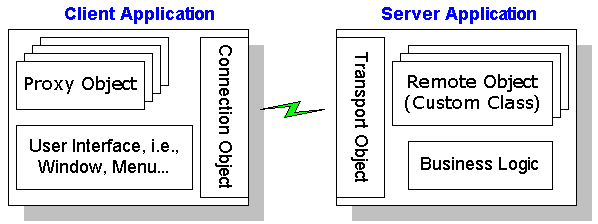
 |
Connection Object: Using this object, you can talk to the server application from the client application. Using this object is similar to using a transaction object. However, unlike SQLCA, there is no built-in global variable for the connection object. You need to instantiate a connection object using CREATE statement and set the attributes similar to the one you set in the SQLCA. In this object, you set attributes like communication-driver name, server computer name and communucation protocol type, etc. Now, you need to call ConnectToServer() function to connect to the server application. |
|
Transport Object: This object is used in the server application to listen all the clients requests. The usage of this object is similar to the "Connection" object. After setting the attributes, you need to call Listen() function to start listining requests from clients. |
|
Application Object: Powersoft added two events to the application object, "ConnectionBegin" and "ConnectionEnd". These two events are triggered in the server application only. The former event triggers whenever a client requests for a connection and the later gets triggered when a client terminates the connection. |
|
RemoteObject( Proxy Object ): In the distributed computing model, you implement all the business logic using "custom class user objects". With version 5.0, you can set a proxy name to any "custom class user object". When you save the user object, PowerBuilder automatically saves the proxy object also in the same library. Before you create the executable, move all the actual user objects that have proxy object set, to the server application and keep the proxy object in the client application. At run-time, you use the proxy object in the programming and the proxy object routes all the function calls to the actual object that is sitting in the server application. Before you use the proxy object in the client application programming, you need to make an additional call, SetConnect(). |