 icon and selecting Built-in option.
| Home | Previous Lesson: Accessing Object's Attributes Next Lesson: Comments |
PowerBuilder has a vast range of built-in functions that can be used in the scripts. We've already seen some of them while creating validation rules for your database tables. To save you from remembering the function names, PowerBuilder allows you to paste functions from the generated list into the code by simply selecting Edit > Paste Special > Function > Buit-in or by clicking the icon and selecting Built-in option.
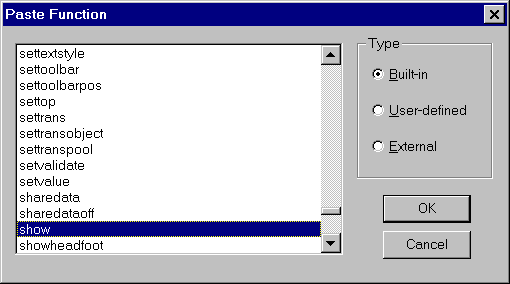
This feature also allows you to paste user-defined and external functions into the code if you defined them.
Let's redo the code for hiding the cb_left button in Accessing Object Attributes topic. Change the code of Clicked event for cb_right CommandButton to:
cb_left.hide()
We did the same thing, i.e., hiding the left side button, however, we are calling a function instead of manipulating the Visible attribute directly. Function calling convention is similar to accessing object properties. Object name and the function name are separated by a period. In this case, the above code calls a function that is declared at cb_left CommandButton.
There are some global functions, i.e., they can be called from anywhere in the application and there is no need to prefix it with an object name. For example,
MessageBox ("Title", "You clicked me.")
is a global function and you can call it anywhere in the PowerBuilder application. To see the list of all global functions, invoke the object browser, select System tab page and double-click on Functions option. You will see all the global functions on the right side.
| Home | Previous Lesson: Accessing Object's Attributes Next Lesson: Comments |