| Home | Previous Lesson: DataWindow Options Next Lesson: Displaying Column's Data as Picture |
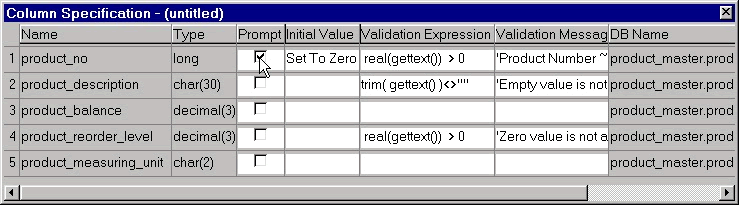
Let's go into details about columns we placed in the DataWindow. If not on the screen, display 'Column Specifications' view by selecting 'View > Column Specifications' menu option.
Column names that are listed in the SELECT statement can be seen under Name column. When a user inserts a new row in the DataWindow, by default it displays a blank record. May be for some columns you would like to display default values. For example, to display 'Not Defined' for the product_description column, specify the same in the 'Initial Value' field for product_description column. Do you remember defining extended attributes in the database painter? While creating a DataWindow, PowerBuilder by default takes those extended attributes. However, changes made to the extended attributes won't affect DataWindows that were already created. They affect DataWindows that are to be created in future.
Similarly, validation rules and validation messages. You can notice in the above picture that PowerBuilder automatically changes the validation definition depending on the datatype. For example, we created v_no_zero_column as @col > 0, for which the datatype was a Number. Here the same definition is changed to real(GetText()) > 0. That's because, PowerBuilder treats the value entered by the user as a string. Before comparing it with a numeric value, we need to convert it into a number. More on GetText() in the PowerScript session.
If you scroll right in the Column Specifications view, you will see another heading 'DB Name'. It's the column name in the database. For example, for product_no, the name in the DataWindow is "product_no" and the name in the database is "product_master.product_no", the default name. The name of a column in the DataWindow can be changed from this view, however 'DB Name', the data type or its width can't be changed here. To see it in action, display the Properties sheet for product_no and change the name. You will see the new name under the Name heading. PowerBuilder uses DB Name when it talks to the database. In programming, we always refer to the Name property and we never refer to the 'DB Name' property. That is for PowerBuilder internal purposes only.
| Home | Previous Lesson: DataWindow Options Next Lesson: Displaying Column's Data as Picture |