| Home | Previous Lesson: What's a DataWindow? Next Lesson: Creating a DataWindow |
There are five steps involved in creating and using a DataWindow in your application:
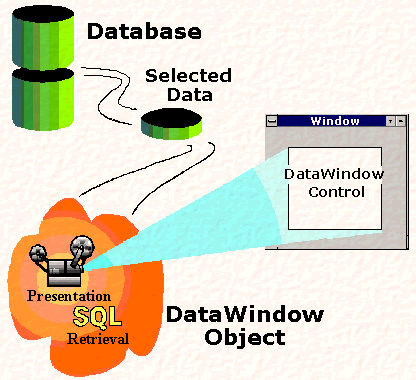
The above diagram illustrates how PowerBuilder uses a data source, DataWindow objects, DataWindow controls and the user interface:
Although the DataWindow object contains all the definitions, it itself can't retrieve data at run-time without placing it in a DataWindow control or DataStore. DataWindow control is a container for the DataWindow object and has events where you can write script to manipulate the DataWindow object using DataWindow control's functions. You act on a DataWindow object via DataWindow control or a DataStore.
DataWindow object is independent of any DataWindow control and can be associated with any number of controls. The DW and DataWindow object association can be changed dynamically at run-time.
| Home | Previous Lesson: What's a DataWindow? Next Lesson: Creating a DataWindow |