| Home | Previous Lesson: Retrieval Arguments Next Lesson: Saving as a Query |
The join operation is the hallmark of the relational database model. More than any other feature, a join distinguishes relational database management systems from other types of DBMSes. We've seen how PowerBuilder automatically joins tables which have the appropriate primary and foreign keys defined, a process that is graphically depicted in the SQL SELECT DataWindow between the product_master and trans tables:
There are basically four types of join:
|
Join |
Description |
|
Equi or Natural |
A relationship between two tables where the values in the two critical columns are compared on the basis of equality, with all the columns in both tables appearing in the results set. Note that only one of the two joined columns is included, as they are identical. This is the default join created by PowerBuilder. |
|
Theta |
Theta joins use the comparison operators as the join condition. Comparison operators include equal (=), not equal(!=), greater than(>), less than(<), greater than or equal to (>=) and less than or equal to(<=). |
|
Self |
A join used for comparing values within a column of a table. Since this operation involves a join of a table with itself, two temporary (correlation) names are to be given to the table. The correlation names are then used to qualify the column names in the rest of the query. |
|
Outer |
A join in which both matching and non-matching rows are returned. The operators *= and =* are used to indicate that all the rows in the first or second tables should be returned, regardless of whether or not there is a match on the join column. |
 If primary and foreign keys are not defined for the tables, PowerBuilder will try to join the tables based on common column names. You should be aware of this, but it isn't bad as you can easily delete any unwanted joins.
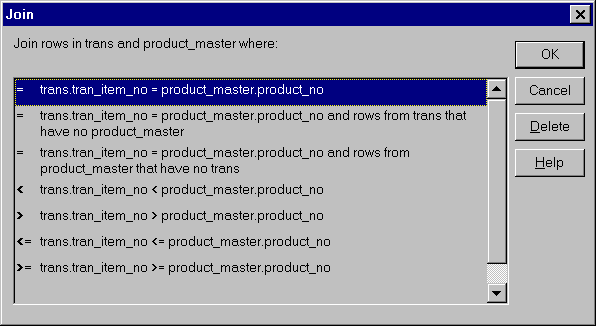
To change or determine the join type, double-click on the join box  .
.
Apart from displaying the join type, it gives an explanation of exactly what will be selected from both tables. You can see in the first case that only rows that are equal in both tables will be selected, whereas the next option�an outer join�allows all the rows from one table with equivalent rows from the other. The bottom four options represent various theta joins.
| Home | Previous Lesson: Retrieval Arguments Next Lesson: Saving as a Query |