| Home | Previous Lesson: Where Clause Next Lesson: Group By Clause |
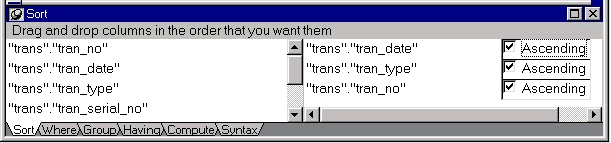
This is where you specify a sort order for the columns that you want to display:
PowerBuilder displays all the selected columns in the list on the left-hand side. By dragging the columns from left to right, you can define the sort criteria for them.
For example, we could sort based on tran_date, simply by dragging it from the left to the right column. A field can be specified to sort either in ascending or descending by checking or clearing the Ascending CheckBox. Please note that everything you specify in this mode, i.e., 'Data Source Definition' mode will be part of the SELECT statement and will be executed by the connected database, not by PowerBuilder. You can also ask PowerBuilder to sort the result set, which will be explained in the coming sections.
If there is more than one column in the sort order, the connected database will sort on the first column in the list, then the second and so on from top to bottom.
| Home | Previous Lesson: Where Clause Next Lesson: Group By Clause |