| Home | Previous Lesson: Switching Between Views Next Lesson: Where Clause |
This is the most flexible and extensively used method for creating a DataWindow. It gives control over the SQL statements even for those who don't know the syntax of SQL.
Invoke the DataWindow painter again for a new DataWindow, select FreeForm presentation style and SQL SELECT data source. PowerBuilder presents the tables/views available in the connected database. Select product_master and trans and click Open button.
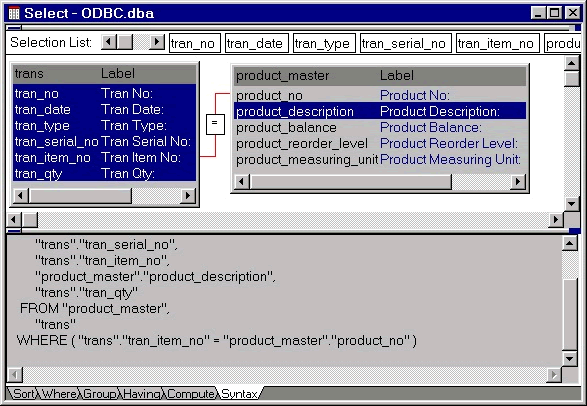
When the tables having foreign key relationship (defined in the database) are opened, PowerBuilder automatically displays the join icon and also creates the SQL statement with the join.
The join in the above picture brings all information from the trans table and also pulls the product_description from the product_master table. All the selected columns appear in the 'Selection List' at the top of the window. To rearrange the columns click on the column name (next to the 'Selection List') and drag and drop at the place where the column is to be placed.
| Home | Previous Lesson: Switching Between Views Next Lesson: Where Clause |