| Home | Previous Lesson: Window Color Next Lesson: Types of Windows |
The X and Y values specify the position of the top left-hand corner of the window. Changing them would be useful for child and popup windows but you also need to change them at run-time. So, just leave them to the defaults and change them at run-time only.
The size and height of the window can be changed from this dialog box. However, we don't see any need for changing this property from this dialog box; you can as well grab the edge of the window and drag it to the required size and position.
You can choose how to open the window: maximized, minimized or normal size. The initial position of the window when it is open would be in the position you specify.
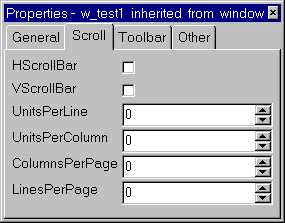
The scrolling options allow you to specify how the standard Windows scrollbars should work. The defaults are as follows:
|
Scrollbar |
Default |
Value |
|
Horizontal |
UnitsPerColumn |
0 - 1/100th of the width of the window |
|
ColumnsPerPage |
0 - 10 columns |
|
|
Vertical |
UnitsPerLine |
0 - 1/100th of the height of the window |
|
LinesPerPage |
0 - 10 lines |
| Home | Previous Lesson: Window Color Next Lesson: Types of Windows |