| Home | Previous Lesson: Defining Tag Values Next Lesson: Window Color |
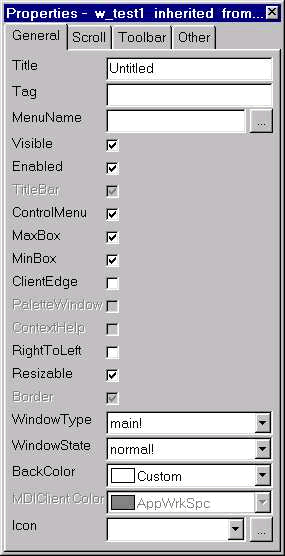
We've looked at all the controls available in a window and properties for each control and seen how to manipulate these controls on a window. However, the window itself has certain properties. To see the properties of the window, click in the windows workspace (the space that is not occupied by any control in the workspace).
You might have observed that till now, when you do the window preview, "Untitled" is being shown in the window title. You can change the window title in the Title prompt.
Each window can have a menu associated with it. For example, while painting a window, you are in the Window painter; you see a menu at the top and a toolbar (Painterbar) associated with the menu. The term "associated" means that the options in the menu have a corresponding toolbar icon in the Painterbar. Similarly, you can paint a menu (We will explain in the next session) and associate that menu to any window you want. A menu can be associated with any number of Windows, where as a Window can have only one menu associated with it at any given time. (You can't associate a menu at this moment, since we didn't paint a menu yet.) Whenever you open the window at run-time, the menu will be automatically displayed.
Standard window (Under MS-Windows) properties such as MaxBox, MinBox, Resizable property can be turned on/off. All the above properties are independent of each other. When you want to turn on/off depends on the application requirement. Depending on the window type (we are going to explain types of windows in a moment), some of the window properties are not editable.
The following table lists Window types and properties. If nothing is mentioned in the table it means that you can turn the property to either True or False.
|
Property/Window Type |
Main |
Child |
Popup |
Response |
MDI Frame |
MDI Frame with Microhelp |
|
Border |
Always On |
Always On |
Always On |
Always On |
||
|
Titlebar |
Always On |
Always On |
Always On |
Always On |
||
|
MaxBox |
No |
|||||
|
Resizable |
No |
|||||
|
MinBox |
No |
|||||
|
ControlMenu |
||||||
|
Menu |
No |
You must provide at design time |
You must provide at design time |
|||
|
ContextHelp |
No |
No |
No |
No |
No |
|
|
PaletteWiindow |
No |
No |
No |
No |
No |
|
|
ClientEdge |
| Home | Previous Lesson: Defining Tag Values Next Lesson: Window Color |