| Home | Previous Lesson: Moving Controls Next Lesson: Spacing Controls |
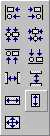
You might have experienced that you can't align controls in a window. To align a group of controls, select controls using one of the methods outlined above, and then select Format > Align and choose one of the following methods of aligning the controls:
If you use the Ctrl method to select controls, PowerBuilder will use the first control selected as the reference point. The reference point control doesn't move and all other controls conform to it. If you use the box swipe method of highlighting multiple controls, the reference control is the last one that is selected.
| Home | Previous Lesson: Moving Controls Next Lesson: Spacing Controls |