
| Home | Previous Lesson: CheckBox Next Lesson: GroupBox |
A RadioButton is similar to a CheckBox, with one difference. When you place more than one CheckBox on the window, you can check any/all/one CheckBoxes on/off. Every CheckBox is independent. Similarly, if you have more than one RadioButton placed on a window, you can always turn on only one RadioButton, no matter how many RadioButtons are there on the window. This behavior makes sense in the example given below, because you can't be single and married at the same time!
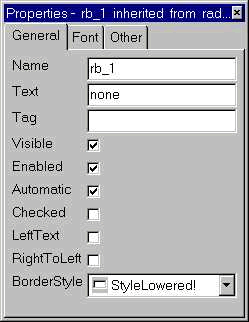
If you select one RadioButton when another RadioButton is already selected, the first RadioButton will be deselected before the second RadioButton becomes activate. However, if the Automatic option is turned off, then you need to write the script to turn on/off RadioButtons appropriately. Other properties for the RadioButton are similar to those of CheckBoxes.

Sometimes, you might have multiple logical groups. For example, from the above picture, RadioButtons related to "Sex" is one logical group, while other RadioButton belong to another logical group "Marital Status". That means user should be able to choose one option from each question, similar to the picture. By default, it is not possible, since as soon as the user selects another RadioButton, previously selected RadioButton becomes de-selected.
For practice, paint the window as shown in the above picture and try to select options from each logical group and see, whether you are able to or not.
The solution for this problem is using a GroupBox. We will explain this in GroupBox section.
| Home | Previous Lesson: CheckBox Next Lesson: GroupBox |