| Home | Previous Lesson: Traditional Model, Component Object Model Next Lesson: Component Object Model (COM) |
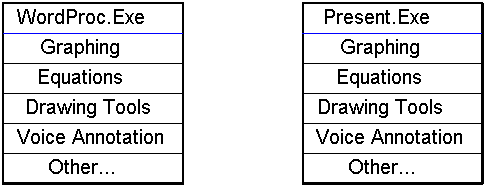
As software vendors tried to add more functionality to their software programs, EXEs got very large. Take the example of a word processing program that does baseline word processing and more features need to be added such as graphing, equation editors, spreadsheet functionality, voice annotation, and more. Typically a developer would add this functionality to the base word processor, thus making the executable quite large. Another example is a presentation program that offers baseline presentation functionality and more features need to be added, such as graphing, equation editors, spreadsheet functionality, voice annotation, and more. Again, typically a developer would add this functionality to the base presentation program, thus making it's executable large as well.
In the above figure, both the WP.EXE and Present.exe contain similar functionality. As an end-user, if you know how to use drawing tools in the word processor, you would hope that it might be similar to the drawing tools in the presentation package, but this may not be the case. If two different developers work on the drawing tools and don't share the code, the User Interface (UI) might be totally different and furthermore, since the functionality is built into each executable, the hard drive space requirements will go up and you will have multiple tools installed that basically perform the same functionality.
There is clearly a better model, the Component Object Model (COM).
| Home | Previous Lesson: Traditional Model, Component Object Model Next Lesson: Component Object Model (COM) |