
| Home | Previous Lesson: DDE versus OLE Next Lesson: OLE - PowerBuilder Implementation |
The Registration Database is a source of information regarding applications and their OLE and association capabilities. This information is used in three cases:
|
by applications that support object linking and embedding |
|
when you open or print a file from File Manager |
|
for associating file name extensions with applications. |
The registration database is set up and maintained by Windows and Windows applications. The database "REG.DAT" is located in the Windows directory (Under Windows 16-bit version). This file should not be moved or deleted. If the file is moved or deleted, loss of functionality in File Manager, Program Manager, and applications that support object linking and embedding, may occur. The Registration Database is modified by running the Registration Editor, REGEDIT.EXE.
The advanced interface of REGEDIT is accessed by running REGEDIT with the /V option (REGEDIT /V). The advanced interface is designed to be used by application developers and system administrators, who modify the Registration Database to manipulate the OLE and Association properties in Windows.
When you run the Registration Information Editor with the /V option, the advanced Registration Editor screen is shown with all of the information in the database. The contents of the Registration Database is branched in a tree format like the directory tree in File Manager. Each branch of the tree is identified by its key name which is Window's internal name for the program.
RegEdit contains the commands that are available to our application when dealing with OLE objects. For instance, let's look at a sample of the registration editor (Under Windows 16-bit):
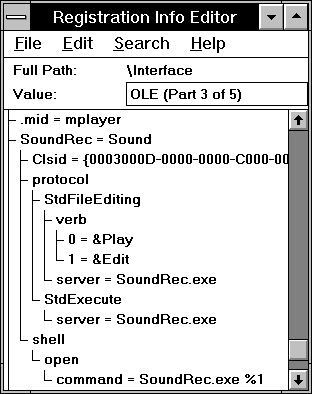
We can see from the above picture, that SoundRec has a class id. An OLE Object is identified uniquely by its class id which is 128-bit long. You will learn more about class ids in "registering PowerBuilder OLE controls in the registration database" in "Distributing OLE Objects". The SoundRec OLE server (which plays sounds) has two possible actions (called VERBs in Windows): Play and Edit. You will learn about verbs in "OLE Objects" topic.
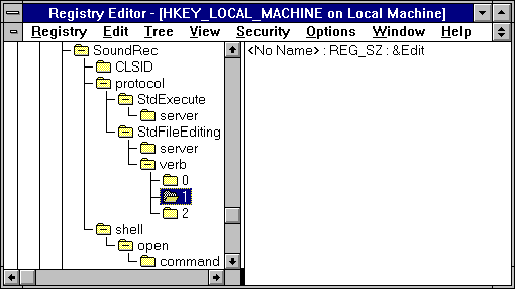
Figure 9 Registry Editor under Windows NT/95.
Whenever you install software, those packages will automatically updates the registry database. Some of the packages allows you not to update the registry and write all those updates to a file. In this case you can merge the update file for that particular software with the registry by using 'S' option, i.e., REGEDIT -S FileName. There is a restriction of 64K maximum size on the .REG file which you merge.
| Home | Previous Lesson: DDE versus OLE Next Lesson: OLE - PowerBuilder Implementation |