| Home | Previous Lesson: Linking or Embedding Next Lesson: OLE Features |
When creating compound documents, whether you use OLE or a monolithic application, the results can appear to be the same from a high-level view. But if you look underneath, they are really quite different.
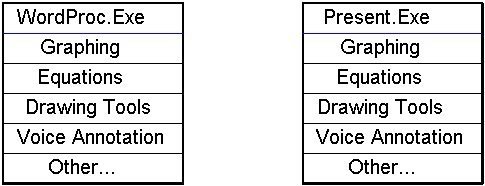
As software vendors tried to add more functionality to their software programs, EXEs got very large. Take the example of a word processing program that does baseline word processing and more features need to be added such as graphing, equation editors, spreadsheet functionality, voice annotation, and more. Typically a developer would add this functionality to the base word processor, thus making the executable quite large. Another example is a presentation program that offers baseline presentation functionality and more features need to be added, such as graphing, equation editors, spreadsheet functionality, voice annotation, and more. Again, typically a developer would add this functionality to the base presentation program, thus making it's executable large as well.
In the above figure, both the WP.EXE and Present.exe contain similar functionality. As an end-user, if you know how to use drawing tools in the word processor, you would hope that it might be similar to the drawing tools in the presentation package, but this may not be the case. If two different developers work on the drawing tools and don't share code, the User Interface (UI) might be totally different and furthermore, since the functionality is built into each executable, the hard drive space requirements go up and you will have multiple tools installed that basically perform the same functionality.
There is clearly a better model, the Component Object Model (COM).
The Component Object Model takes some of the core functionality out of the executables and make them stand-alone objects that can be called from any application that supports OLE.
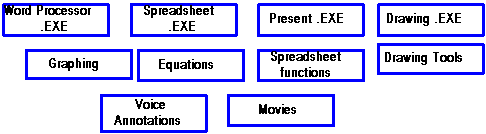
Above figure shows, the added functionality that was discussed in the Traditional Model is now broken out into separate objects. The advantages are numerous. First, if you need to add charts into a container document, the same charting engine will be used and the same User Interface is applied, thus reducing the learning curve significantly. Secondly, each baseline executable will be smaller and the separate objects will not be duplicated on the hard disk, just simply installed in a common place so they can be commonly called from each baseline application. Lastly, this promotes the notion of "best of breed" objects, meaning that if you don't like the drawing tools, simply install a better set of drawing tools and the newly installed drawing tools will be available in each application.
| Home | Previous Lesson: Linking or Embedding Next Lesson: OLE Features |