
| Home | Previous Lesson: Tracing ODBC Driver Manager Calls Next Lesson: New Debugger in Version 6.0 |
General Protection Fault (GPF) is very common during PowerBuilder development. It may be because of our coding or PowerBuilder internal problems. You might find more GPFs from PowerBuilder internals rather than from our mistakes. When a GPF error occurs, the operating system won't even allow us to take a screenshot. If you are using Windows 95/NT 4.0, the operating system automatically logs and terminates the application. ( Actually, you have an option of ignoring or closing the application, but, if you choose the "Ignore" option, nothing happens, so, you are forced to close the application. )
This section is applicable to Windows 3.1/3.11 for workgroup/NT 3.51 users only. The only tool which PowerBuilder doesn't provide is, the one with which you can log the details when a GPF error occurs. If you are running PowerBuilder under Windows 3.11 or Windows NT 3.51, there is a tool called Dr. Watson available.
|
Note that this program must be running in the memory before the GPF occurs for it to have any effect. It is suggested that you create a Program Item for this software in your StartUp Group, by which, every time you run PowerBuilder, this facility is available to record the errors without you remembering to start it manually. |
We tried to create a DataWindow of Quick Select data source and clicked on the "product_master" table name from the list of tables, which resulted in a GPF. Dr Watson prompted us to write a little description about the problem:
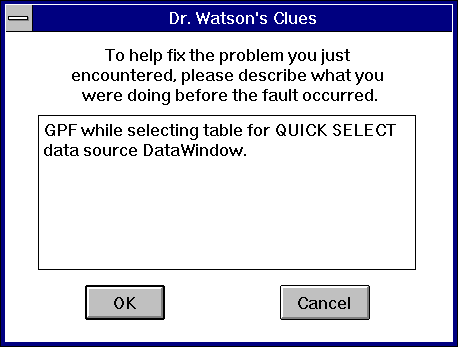
All the environment details are then recorded in the log. This file includes error details, CPU Registers dump, system information such as RAM, Storage, Free GDI and so on:
Start Dr. Watson 0.80 - Mon Dec 23 14:13:26 1996
********************************************
Dr. Watson 0.80 Failure Report - Mon Dec 23 14:14:49 1996
PB050 had a 'Null Selector (Read)' fault at PBDWE050 61:5964
$tag$PB050$Null Selector (Read)$PBDWE050 61:5964$repne scasb
$Mon Dec 23 14:14:49 1996
You can then call PowerBuilder's technical support and give them this information to help you solve the problem.
| Home | Previous Lesson: Tracing ODBC Driver Manager Calls Next Lesson: New Debugger in Version 6.0 |