NOTE: Scroll down for the screenshots...
My knowledge and expertise in programming and music let me create Piano-Forte© applications with a Music Master user-interface on PowerBuilder, CA-Clipper and QBasic. Piano-Forte is a marriage of computers and music - by PowerObject! [Shekar]:
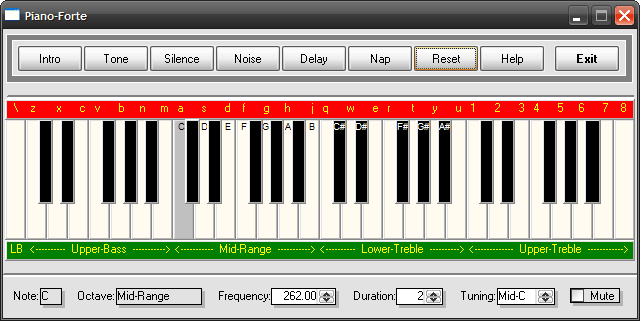
- PowerBuilder version: This is quality-rich but incomplete. This is a pibble that you could run from within PowerBuilder or compile it into an executable.
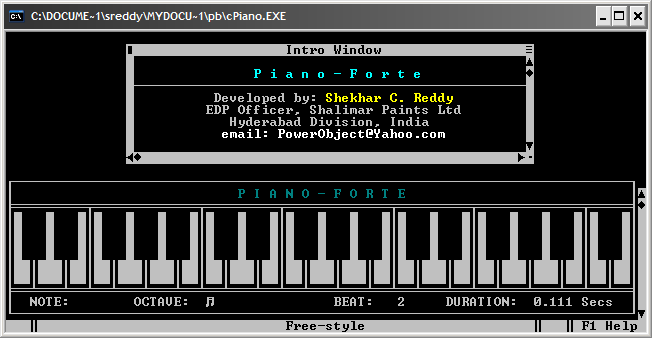
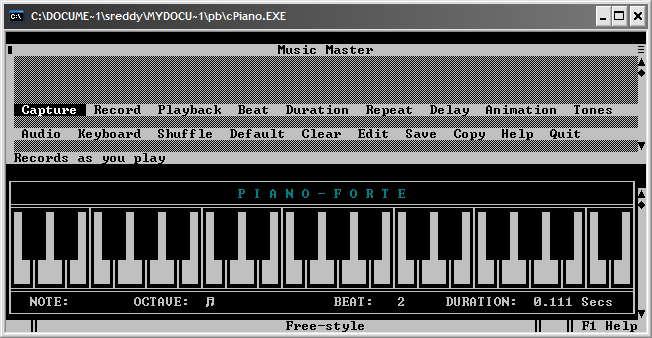
- CA-Clipper version: Stand-alone executable with a plenty of tweaking options - as you would see - and it's a great pleasure to play on it. This is exhaustive in options, can save recordings to .pno files (dBASE tables) and play them back later. This works in the Music Master (toggle F2) user-interface providing menu-system, keyboard shortcuts, help... It offers options such as beat, duration (+/-), frequency, repeat, capture (automatic), record (manual), playback (with a mini file-manager), mute, toggle behavior, show/hide keyboard (toggle F3), enable/disable animations (toggle F4), transpose/shuffle (toggle F5), configuration, signature/exit tunes, command-line parameters to load a file at startup and play it back with options to hide the keyboard, disable animations, mute, etc. I used advanced programming techniques such as OOP, code-blocks (aka pointers in C), lexical scoping, parallel/multi-dimensional arrays, etc to squeeze maximum performance, ease-of-use and maintainability. However, the shortest duration for a tone is 1/18th of a second in this version due to the limitation of CA-Clipper and hence, the saved files may not play back with the same precision with respect to silence between each note with which they were captured/recorded. It creates the Piano.fil table and the Piano.idx index if they do not exist on launch and fills the table with necessary data for basic functionality. The provided Piano.hlp file is not a Windows' Help file - it's just a text file! F1: toggle brief help. Shift+F1: detailed help. Esc: close detailed help.
Basically, this version of Piano-Forte functions in 4 different modes:
FREE-STYLE: The Default mode - you just play on it.
CAPTURE: You can capture whatever you play until you press Esc; You can save the capture to a dBASE-file with a .pno extension! Saved .pno files can be played back at anytime (press F2 for Music Master interface that offers a mini file manager).
RECORD: Manual-recording of notes to form a tune; needs knowledge of music (Yes, I am a musician). Recordings can be saved to a .pno table.
PLAY-BACK: Plays back a saved .pno file; slips back to Free-Style after play-back is finished.
Piano-Forte's functioning is rendered programmatically using 4 arguments:
FREQUENCY: Notes of the 4 octaves (see below)
DURATION: 1-1080 (1/18th second - 60 seconds)
REPEAT: 1-99 cycles
SILENCE: 0.00 - 99.9 seconds
The home-keys asdfghjk represent the Mid-Range of CDEFGAB of the Western notation. The Piano-Forte supports four octaves with the following keys for the notes (sharps/semi-tones are produced by pressing Shift and the key):
UPPER BASS: zxcvbnm,
MID-RANGE: asdfghjk
LOWER TREBLE: qwertyui
UPPER TREBLE: 12345678
Notice the relationship between the following keys with the notes in Western notation:
==========================================
NOTE C C# D D# E F F# G G# A A# B C
-----------------------------------------------------------------------------
KEY aA S s D d f F gG H h J j kK
==========================================
Notes with a hash-mark (#) are the semi-tones/sharps. You would notice that an octave has 12 notes (7 Tones and 5 semi-Tones - the E and B do not have semi-tones!) and the 13th note is always the first note of the next octave. So also, the first note of an octave is always the 13th note of the previous octave. Octaves are cyclic.
This version currently creates dBASE files to save automatic captures/manual recordings and playback later. I am currently working on a version that can create/take text-files as source files for capture/playback. The text-files would have the extention of PNO with the following structure:
NOTE DURATION OCTAVE REPEAT SILENCE
------------------------------------------------------------------
A-G 1-1040 -3 to +5 1-n 0.1-n
So, anyone having a basic knowledge of music can create PNO files using a text-editor (or capture using the capture/record modes from Piano-Forte) and then fine-tune the composition easily. Since the text-files are populated into multi-dimensional arrays at launch, playback would be as much precise and faster as possible.
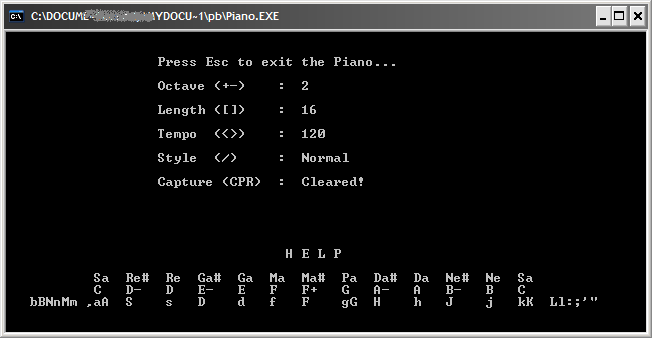
- QBasic version: Stand-alone executable. This is functional with adequate options but not much to user interface (CUI). This version provides maximum precision with the shortest possible tone duration, frequency, tempo (in the real sense!), style, capture, etc with keyboard shortcuts. It is amazing a tiny language such as QBasic can offer so much precision. We can even develop more advanced piano applications in QBasic that actually use various instruments at runtime but I've not gone to that extent. You can save a recording to a .pno text file and play it back later. This version functions in 3 modes: free-style, capture and playback. To manually record a tune, you may create a .pno text file of notes with frequency, duration, silence, etc and play it back. Needs QBasic to run the saved files. Further, the captured files need to be modified with proper duration and silence parameters for/between each Note.
NOTE: Scroll down for the screenshots...
--
PowerObject!
[Shekar C. Reddy]
PowerBuilder Developer
|
 Updating... Shekar Reddy, Nov 23, 2011, 3:41 PM
|