| Datawindow Quick Sort Indicator |
| Almost every PowerBuilder datawindow developed in recent
years has probably had the quick sort feature. This feature allows the
user to click on the column heading and the datawindow will be sorted
based on the column the user clicked. This is a great little feature and
is normally implemented as a service in class libraries the world over.
Therefore this tip does not tell you how to implement the service but
how to enhance it.
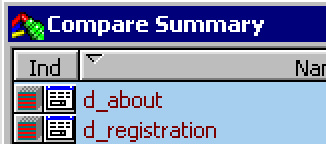
In a previous article on Visual Cues I preached the virtues of including a visual cue to the user to indicate the existence of features within your application. One such idea was to include a little bitmap on the sorted column to indicate two things 1) that the quick sort feature is there and 2) which column the user had clicked. When I was writing PBDelta Version 3 I added the quick sort feature to all the datawindows, another goal I was trying to achieve in PBDelta was the correct colour schemes based on the users preferences. See my other article on use of colour. The problem I encountered was in making the background colour of the quick sort indicator transparent so that the correct colour scheme was used. Charles Ginzel suggested that I used lines to create my image in place of the small bitmap I was using so that the colors would be correct. The following code is used by my quick sort service to create a little triangle on top of the column that is currently sorted as a visual cue to the user. The triangle points up or down depending on the sort sequence and is based on the standard windows colours. This has the advantage that the colours match the users selected colour scheme and the middle of the image shows through as transparent.
/******************************************************************** Create_SortKey <DESC> Create a sort key image for the given column.</DESC> <ACCESS>Protected <ARGS> as_Column: Column Name to Create for. as_sort: Sort Sequence A/D.</ARGS> <USAGE> this.Create_SortKey( 'column1', 'A' )</USAGE> ********************************************************************/ Long ll_X1, ll_Y1, ll_X2, ll_Y2, ll_X3, ll_x4, ll_Y3, ll_Y4 dw_ic ldw_DW String ls_Mod // Get the datawindow control for the service ldw_DW = idw_Parent() ldw_DW.SetRedraw( FALSE ) ll_X1 = Long( ldw_DW.Describe( as_Column + '_t.X' ) ) + 5 ll_Y1 = Long( ldw_DW.Describe( as_Column + '_t.Y' ) ) + 3 ls_Mod = 'destroy sort_ln1 destroy sort_ln2 destroy sort_ln3' ldw_DW.Modify( ls_Mod ) ll_X2 = PixelsToUnits( & UnitsToPixels( ll_X1, XUnitsToPixels! ) + 4, XPixelsToUnits! ) ll_X3 = PixelsToUnits( & UnitsToPixels( ll_X1, XUnitsToPixels! ) + 3, XPixelsToUnits! ) ll_X4 = PixelsToUnits( & UnitsToPixels( ll_X1, XUnitsToPixels! ) + 8, XPixelsToUnits! ) ll_Y2 = PixelsToUnits( & UnitsToPixels( ll_Y1, YUnitsToPixels! ) + 4, YPixelsToUnits! ) ll_Y3 = PixelsToUnits( & UnitsToPixels( ll_Y1, YUnitsToPixels! ) + 5, YPixelsToUnits! ) ll_Y4 = PixelsToUnits( & UnitsToPixels( ll_Y1, YUnitsToPixels! ) - 1, YPixelsToUnits! ) // If the sort sequence is ascending or decending IF as_Sort = 'A' THEN ls_Mod = 'create line(band=header x1="' + String( ll_X1 ) & + '" y1="' + string( ll_Y1 ) & + '" x2="' + String( ll_X4 ) + '" y2="' & + String( ll_Y1 ) + '" pen.style="0" pen.width="5" ' & + 'pen.color="33554432" background.mode="2" ' & + 'background.color="16777215" name=sort_ln1 )' ls_Mod += ' create line(band=header x1="' + String( ll_X1 ) & + '" y1="' + string( ll_Y1 ) & + '" x2="' + String( ll_X2 ) + '" y2="' & + String( ll_Y2 ) + '" pen.style="0" pen.width="5" ' & + 'pen.color="33554432" background.mode="2" ' & + 'background.color="16777215" name=sort_ln2 )' ls_Mod += ' create line(band=header x1="' + String( ll_X4 ) & + '" y1="' + string( ll_Y1 ) & + '" x2="' + String( ll_X3 ) + '" y2="' & + String( ll_Y3 ) + '" pen.style="0" pen.width="5" ' & + 'pen.color="1089522856" background.mode="2" ' & + 'background.color="16777215" name=sort_ln3 )' ELSE ls_Mod = 'create line(band=header x1="' + String( ll_X1 ) & + '" y1="' + string( ll_Y2 ) & + '" x2="' + String( ll_X4 ) + '" y2="' + String( ll_Y2 ) & + '" pen.style="0" pen.width="5" ' & + 'pen.color="1089522856" background.mode="2" ' & + 'background.color="16777215" name=sort_ln1 )' ls_Mod += ' create line(band=header x1="' + String( ll_X1 ) & + '" y1="' + string( ll_Y2 ) & + '" x2="' + String( ll_X2 ) + '" y2="' + String( ll_Y1 ) & + '" pen.style="0" pen.width="5" ' & + 'pen.color="33554432" background.mode="2" ' & + 'background.color="16777215" name=sort_ln2 )' ls_Mod += ' create line(band=header x1="' + String( ll_X4 ) & + '" y1="' + string( ll_Y2 ) & + '" x2="' + String( ll_X3 ) + '" y2="' & + String( ll_Y4 ) + '" pen.style="0" pen.width="5" ' & + 'pen.color="1089522856" background.mode="2" ' & + 'background.color="16777215" name=sort_ln3 )' END IF // Create the triangle ldw_DW.Modify( ls_Mod ) is_Lastcolumn = as_Column is_LastDir = as_Sort ldw_DW.SetRedraw( TRUE ) |